

Agentic AI vs Workflow Automation: The 2026 Enterprise Guide to Choosing (and Paying for) the Right One
Here is a conversation happening in almost every boardroom right now. Someone says "we need AI agents." Someone else says "we already have Zapier." And then the room goes quiet, because nobody is entirely sure whether those are the same thing, different things, or competing things.
They are different things. And the difference is worth real money.
Gartner predicts that 40% of enterprise applications will feature task-specific AI agents by the end of 2026, up from less than 5% in 2025. At the same time, Gartner also expects 40% of agentic AI projects to be cancelled by the end of 2027 because of unclear ROI, poor governance and rushed implementation. Both of those numbers can be true at once. The companies winning with agentic AI are the ones that understand exactly what it is, what it costs, and when plain old workflow automation is actually the smarter buy.
This guide covers all of it: clear definitions, honest comparisons of n8n, Zapier and Make against custom AI agents, the real cost of building your own, the ROI maths, and what the next few years look like. By the end you should be able to walk into that boardroom conversation and settle it.
What is Workflow Automation?
Workflow automation is software that follows a fixed set of instructions to move data and trigger actions between your business tools, without a human clicking anything. When X happens, do Y. When a form is submitted, create a CRM record. When an invoice is paid, send a receipt and update the spreadsheet.
Think of it like a row of dominoes. You spend time setting them up in exactly the right order, then a trigger knocks the first one over and the rest fall in sequence. Every single time, the same dominoes fall in the same order. That predictability is the whole point.
Workflow automation has been quietly running the back office of modern business for over a decade. Tools like Zapier (launched 2011), Make (formerly Integromat) and n8n turned what used to be custom developer work into something an operations manager could build on a Tuesday afternoon. The category exploded because the value proposition is so simple: stop paying humans to copy and paste data between systems.
A typical enterprise workflow automation might look like this:
A lead fills in a form on your website
The automation creates a contact in HubSpot
It checks the company size against a database
It posts a summary to the sales team's Slack channel
It adds a row to a reporting sheet
Five steps, zero thinking. The automation never wonders whether this lead looks unusual, never adapts its approach, and never handles a situation you did not explicitly build for. If step 3 receives data in a format it has never seen, the workflow errors out and someone gets an alert email.
That rigidity is a feature, not a bug. For high-volume, repetitive, rules-based work, you want a system that does exactly the same thing every time. Finance teams, compliance teams and auditors love workflow automation precisely because it is boring and predictable.
The limits show up when the work requires judgement. A rules-based workflow cannot read an angry customer email and decide how apologetic to be. It cannot look at a messy invoice and figure out which line items matter. It cannot plan. For that, you need the other thing.
What is Agentic AI?
Agentic AI is software that uses a large language model as a reasoning engine to pursue a goal: it plans its own steps, chooses which tools to use, acts, checks its results, and adjusts course, all with minimal human supervision. Instead of following your instructions step by step, you give it an outcome and it works out the steps itself.
If workflow automation is a row of dominoes, an AI agent is more like a capable new hire. You do not hand a new hire a 40-step checklist for every possible situation. You say "handle refund requests under $200, escalate anything suspicious, and keep the tone friendly." Then they use judgement to deal with whatever version of that task shows up.
Under the hood, an AI agent typically combines four ingredients:
A reasoning engine. A large language model (like Claude or GPT) that interprets the goal, breaks it into steps and decides what to do next.
Tools. Connections to your real systems: email, CRM, databases, payment platforms, internal APIs. This is what separates an agent from a chatbot. A chatbot talks about work; an agent does work.
Memory. Context about past interactions, your business rules, and what it has already tried on the current task.
A feedback loop. The agent observes the result of each action and adjusts. If an API call fails, it can retry differently. If data looks wrong, it can flag it instead of blindly passing it along.
The practical difference shows up in the kind of work each can handle. Workflow automation handles the lead-routing example above beautifully. An agent can handle something like: "Read every inbound support email, resolve the ones you can using our help docs and order system, draft replies for the tricky ones, and escalate anything involving legal threats or refunds over $500." No fixed path exists for that task. The agent decides the path per email.
One important nuance for 2026: the market has muddied the word "agent" badly. Zapier, Make and n8n all now sell features called agents. Some of these are genuinely agentic (they reason and choose actions dynamically). Some are traditional workflows with an AI step bolted on, which is useful but not the same thing. When a vendor says "agent," always ask: does it decide its own steps, or does it follow steps a human drew on a canvas? The answer changes what you should expect from it, and what can go wrong.
Adoption reflects both the excitement and the growing pains. 79% of enterprises say they have adopted AI agents, but only around 11% are running them in production, and Gartner's 2026 CIO survey found only 17% of organisations have actually deployed agents so far, though more than 60% expect to within two years. Translation: everyone is experimenting, few have crossed the finish line, and the ones who have are pulling ahead.
Workflow Automation vs AI Agents: The Real Differences
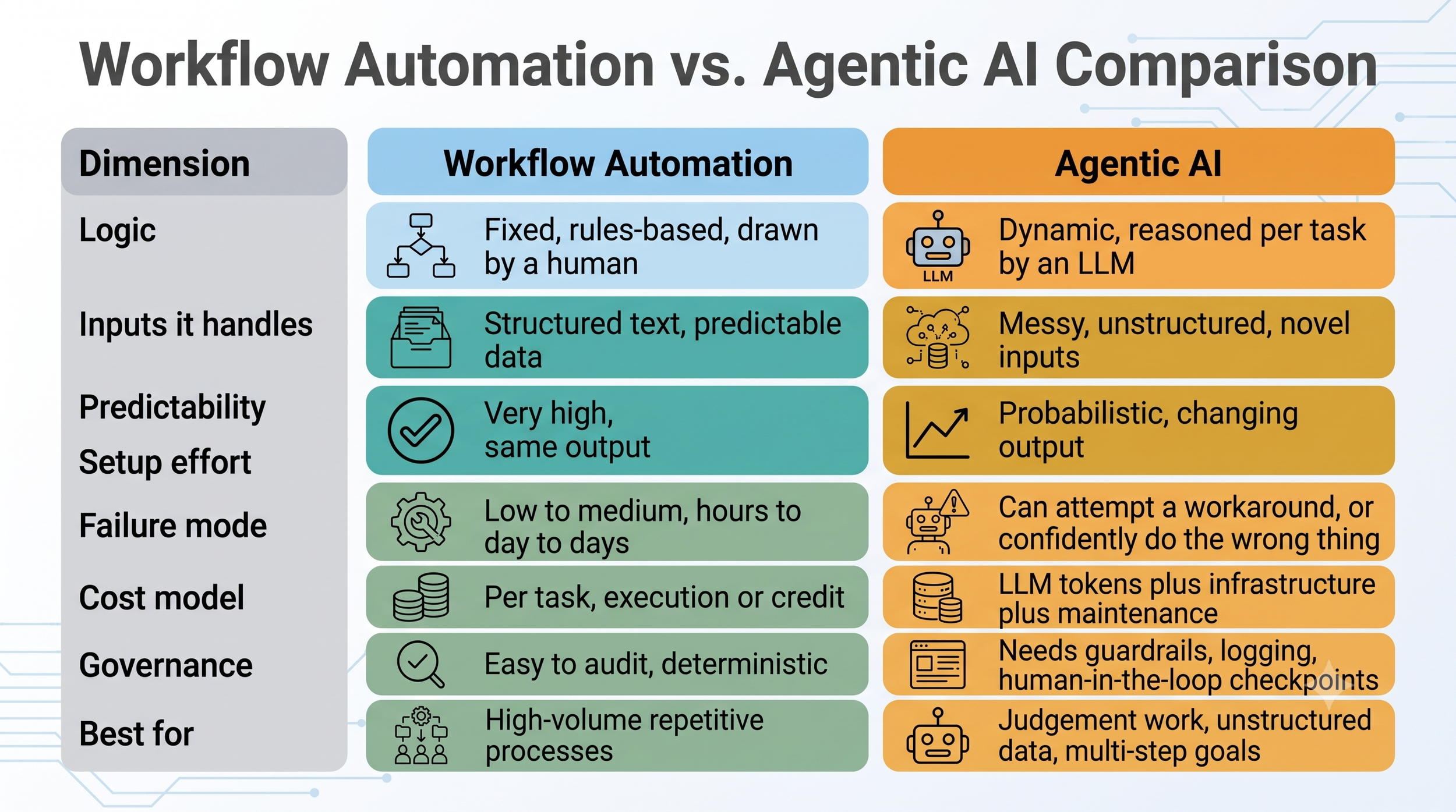
The short version: workflow automation executes decisions a human already made, while AI agents make decisions within boundaries a human set. Everything else flows from that one distinction.
Here is how the two compare on the dimensions enterprises actually care about:
Bots and Brand Works
A few of these deserve unpacking.
Predictability cuts both ways. A workflow gives you the same result every time, which is perfect until reality sends something the rules never anticipated. An agent adapts to the unexpected, which is powerful until it adapts in a way you did not want. This is why serious agent deployments include human approval gates for high-stakes actions like sending money, signing contracts or emailing customers at scale.
The cost models are fundamentally different. Workflow automation pricing is mostly a function of volume: tasks, executions, credits. Agent costs are a function of complexity: how much reasoning (tokens) each task needs, plus the engineering to build and maintain the thing. A workflow that runs 100,000 times a month can be cheap. An agent that runs 100,000 times a month needs a proper budget line.
Failure looks different. When a workflow breaks, it usually breaks loudly: an error, a halted run, an alert. When an agent fails, it can fail quietly and plausibly, producing output that looks right but is not. Your monitoring strategy has to account for that. Deterministic systems need uptime monitoring; agentic systems need quality monitoring.
The honest conclusion most enterprises reach: this is not an either/or decision. The strongest automation stacks in 2026 are hybrids. Deterministic workflows handle the predictable 80% of volume cheaply and reliably, and agents handle the messy 20% that used to require a human. The workflow is the conveyor belt; the agent is the skilled worker standing at the point on the belt where judgement is required.
Why Enterprises Are Moving Beyond No-Code
No-code automation platforms did exactly what they promised. They let non-developers automate real work, and they proved the value of automation to every finance director who signed off on the subscription. So why are enterprises now hitting their limits?
Because the platforms were designed for a world of simple, low-volume, rules-based tasks, and enterprises have automated their way straight past that world. Four walls tend to appear, usually in this order.
Wall one: cost at scale. Per-task pricing is brilliant at low volume and brutal at high volume. A 10-step Zapier workflow that runs 5,000 times a month consumes 50,000 tasks, while the same process on n8n counts as 5,000 executions, because n8n charges per workflow run rather than per step. Scale that across dozens of workflows and the difference is a full-time salary. Enterprises routinely discover their automation bill growing faster than the value of what is being automated.
Wall two: complexity. Linear trigger-action logic starts to creak when you need branching, loops, error recovery, custom data transformations, or workflows that call other workflows. Builders end up with spaghetti: forty Zaps that nobody fully understands, held together by one operations person who is now a single point of failure. That is not automation; that is technical debt with a friendly UI.
Wall three: data control and compliance. Most no-code platforms are cloud-only, which means your customer data flows through someone else's infrastructure. For companies in healthcare, finance, legal or the EU's tighter data regimes, that is somewhere between uncomfortable and unacceptable. This is a big reason self-hostable tools like n8n gained enterprise traction, and why fully custom builds appeal to regulated industries.
Wall four: intelligence. The hardest wall. No amount of clever workflow design lets a rules-based system read a contract, triage a nuanced complaint, or reconcile messy data that arrives in a different format every time. The work that remains unautomated in most enterprises is unautomated precisely because it needs judgement. Rules ran out; reasoning is required.
The numbers back up the shift in spending. 88% of executives plan to increase AI budgets in the next 12 months specifically because of agentic AI, and the agentic AI market grew from roughly $7.6 billion in 2025 to a projected $10.8 billion in 2026. Gartner's long-range view is even bigger: agentic AI could account for about 30% of enterprise application software revenue by 2035, over $450 billion.
None of this means no-code is dead. It means no-code is being repositioned: from "the automation strategy" to "one layer of the automation strategy." The question for each workflow is no longer "can we build this in Zapier?" It is "does this need rules, reasoning, or both, and where should each live?"
n8n vs Custom AI Agents
n8n sits in an interesting position in this debate, because it is the no-code tool that has leaned hardest into agentic AI. So the comparison here is genuinely close, and the right answer depends on your team and your risk profile.
What n8n gives you. n8n is a source-available workflow automation platform you can run in the cloud or self-host. Its execution-based pricing is the most enterprise-friendly of the big three: cloud plans run from €24/month (Starter, 2,500 executions) through €60/month (Pro, 10,000 executions) to €800/month (Business, 40,000 executions), with a free self-hosted Community Edition offering unlimited executions. Crucially, one execution is one workflow run regardless of how many steps it contains, so complex workflows do not multiply your bill.
On the AI side, n8n now ships native LangChain integration with 70+ AI nodes, which means you can build genuine agent patterns inside it: an LLM node that reasons, tool nodes it can call, memory, and retrieval over your own documents (RAG). For a technical team, n8n is arguably the fastest way to stand up a working agent prototype without writing a full application.
What custom agents give you that n8n cannot.
Full control of the reasoning loop. In n8n, the agent logic lives inside the shapes n8n provides. A custom build (using frameworks and SDKs directly) lets you design exactly how the agent plans, retries, self-checks and escalates. For complex multi-agent systems, that control stops being a luxury.
Deep integration with ugly systems. Enterprises average 897 applications, with only 29% connected through modern APIs. n8n connects beautifully to things with APIs. The 2008-era ERP with no API needs custom adapters, and at that point you are doing custom development anyway.
Performance and cost tuning at scale. Custom builds let you route easy tasks to cheap models and hard tasks to premium ones, cache aggressively, and squeeze token costs. Inside a visual platform, you take the platform's defaults.
No platform ceiling. Version control, automated testing, CI/CD, fine-grained observability: standard in a custom codebase, partial or plan-gated in n8n.
The honest decision rule. If your agent use case is departmental, your volumes are moderate, and you have one or two technically comfortable people, n8n will get you to value in weeks and is a superb proving ground. If the agent touches regulated data, core revenue processes, or needs to behave reliably at serious scale, treat n8n as your prototype and a custom build as your production system. Plenty of smart teams do exactly that: prove ROI on n8n in a quarter, then graduate the winning use case to custom.
At Bots and Brand Works we build both, and we often recommend starting on n8n even to clients who will eventually outgrow it. Proving the value cheaply first makes the business case for the custom build write itself.
Zapier vs AI Agents
Zapier is the tool most enterprises already have, which makes this the comparison most decision-makers actually need.
What Zapier does brilliantly. Nothing beats Zapier for breadth and speed. With around 7,000+ app integrations, a marketer can connect two tools in ten minutes with zero IT involvement. Pricing starts free (100 tasks/month), with Professional from $19.99/month (750 tasks) and Team plans from around $103.50/month for 2,000 tasks. For simple, low-volume glue between SaaS tools, Zapier remains the default for a reason.
Where the maths breaks. Zapier charges per task, meaning per step, per run. Every action in a Zap consumes a task. That 10-step workflow running 5,000 times a month is 50,000 tasks, and at enterprise volumes costs escalate quickly. The community has a name for the moment the invoice stops making sense: the "Zapier Wall".
What about Zapier Agents? Zapier has moved into agentic AI with Zapier Agents, which let you describe a behaviour in natural language and have an AI carry it out across your connected apps. Two things to know. First, Agents are billed separately from your main Zapier plan, with a free tier around 400 activities/month and paid tiers from roughly $20/month for 1,500. Second, they inherit Zapier's cloud-only model, so the data-control questions remain.
Zapier Agents are a good fit for lightweight personal-productivity agents: triage my inbox, research this lead, draft this follow-up. They are not designed for the heavy end: multi-agent orchestration, custom guardrails, on-premise data, deep legacy integration, or fine control over which model does what.
The honest decision rule. Keep Zapier for what it is best at: fast, simple, low-volume connections that business users own. Use Zapier Agents to let individuals experiment with agentic patterns safely. But when a process becomes high-volume (cost), complex (spaghetti risk), or judgement-heavy (intelligence), that process has outgrown Zapier. Migrating it to n8n or a custom agent typically pays for itself within months at enterprise volume.
Make vs AI Agents
Make (formerly Integromat) sits between Zapier's simplicity and n8n's technical depth: a visual canvas that handles branching, iteration and complex data mapping better than Zapier, at a famously aggressive price point.
What Make gives you.Plans run from free (1,000 credits/month) through Core at $9/month and Pro at $16/month to Teams at $29/month, with Enterprise custom. In 2025-2026 Make renamed its billing unit from operations to credits: a standard module action costs one credit, while AI-native modules and code execution consume credits at higher, variable rates. That last detail matters more than it sounds, because it means AI-heavy scenarios consume credits at rates that are hard to forecast.
Make has also shipped genuine agentic features: Make AI Agents rolled out across all plans in February 2026, alongside an Agent Builder that creates agents from a prompt and cloud-computer capabilities for agents that need to operate a browser.
Where it falls short of custom agents. The story rhymes with Zapier's. Make's agents live inside Make's cloud, run on Make's credit economics, and offer Make's guardrails. The per-module credit model also means the same billing trap as Zapier applies, just at lower prices: complex scenarios burn credits per step, and agentic scenarios that reason across many modules burn them unpredictably. For a CFO trying to budget an AI programme, "variable credits depending on model and token usage" is not a line item anyone enjoys.
Make also shares no-code's structural ceilings: limited version control and testing, integrations bounded by the connector catalogue, and no self-hosting. For European businesses Make's EU data centres help with data residency, but it is still a shared cloud platform rather than your infrastructure.
The honest decision rule. Make is arguably the best value pure workflow automation tool on the market, and a fine place to run your deterministic 80%. Its agents are worth experimenting with for contained use cases. But the same graduation logic applies: when a use case becomes core, regulated or expensive at volume, the economics and control of a custom agent win. Make is the affordable middle of the stack, not the top of it.
When Should You Move Beyond n8n?
Since n8n is where many technical teams land after outgrowing Zapier and Make, the sharper question is when you outgrow n8n itself. Watch for five signals.
1. Your agent logic no longer fits on a canvas. Visual workflows are wonderful up to a point. When your agent needs dynamic planning across dozens of possible tool calls, sub-agents that spawn sub-agents, or recovery logic more sophisticated than "retry three times," the canvas becomes the constraint. If your team is fighting the tool to express the logic, the tool is done.
2. You need engineering-grade reliability. Production software gets code review, automated tests, staging environments and observability. n8n offers versions of some of this (Git-based source control and environments arrive on the Business plan at €667+/month self-hosted), but a business-critical agent eventually deserves the full software development lifecycle, and that means a codebase.
3. Token costs need serious optimisation. At scale, LLM spend dwarfs platform spend. Custom builds can route requests across models by difficulty, batch and cache aggressively, and trim prompts token by token. Inside any visual platform you have blunt instruments where you need scalpels.
4. Compliance requirements get specific. Self-hosted n8n solves data residency. It does not by itself give you audit trails designed around your regulator's expectations, custom access controls per agent action, or formally testable guardrails. Financial services, healthcare and legal typically need those custom.
5. The automation IS the product. If agents are becoming part of what you sell, or a core operating advantage, you want to own the intellectual property, the roadmap and the margins. Building your differentiator on a third-party platform's feature set means your ceiling is their roadmap.
A useful rule of thumb: n8n is the right home for roughly the first £50k-equivalent of annual value per use case. Beyond that, the savings from optimisation and the risk reduction from proper engineering usually justify custom. And migration is not starting over: a well-built n8n prototype is effectively a working specification for the custom build, which shortens the project considerably.
Not sure which side of the line you are on? This is exactly the assessment Bots and Brand Works runs for clients: we map your current workflows, score each against these five signals, and give you a build-vs-platform verdict per use case rather than one ideological answer.
The Cost of Custom AI Agents
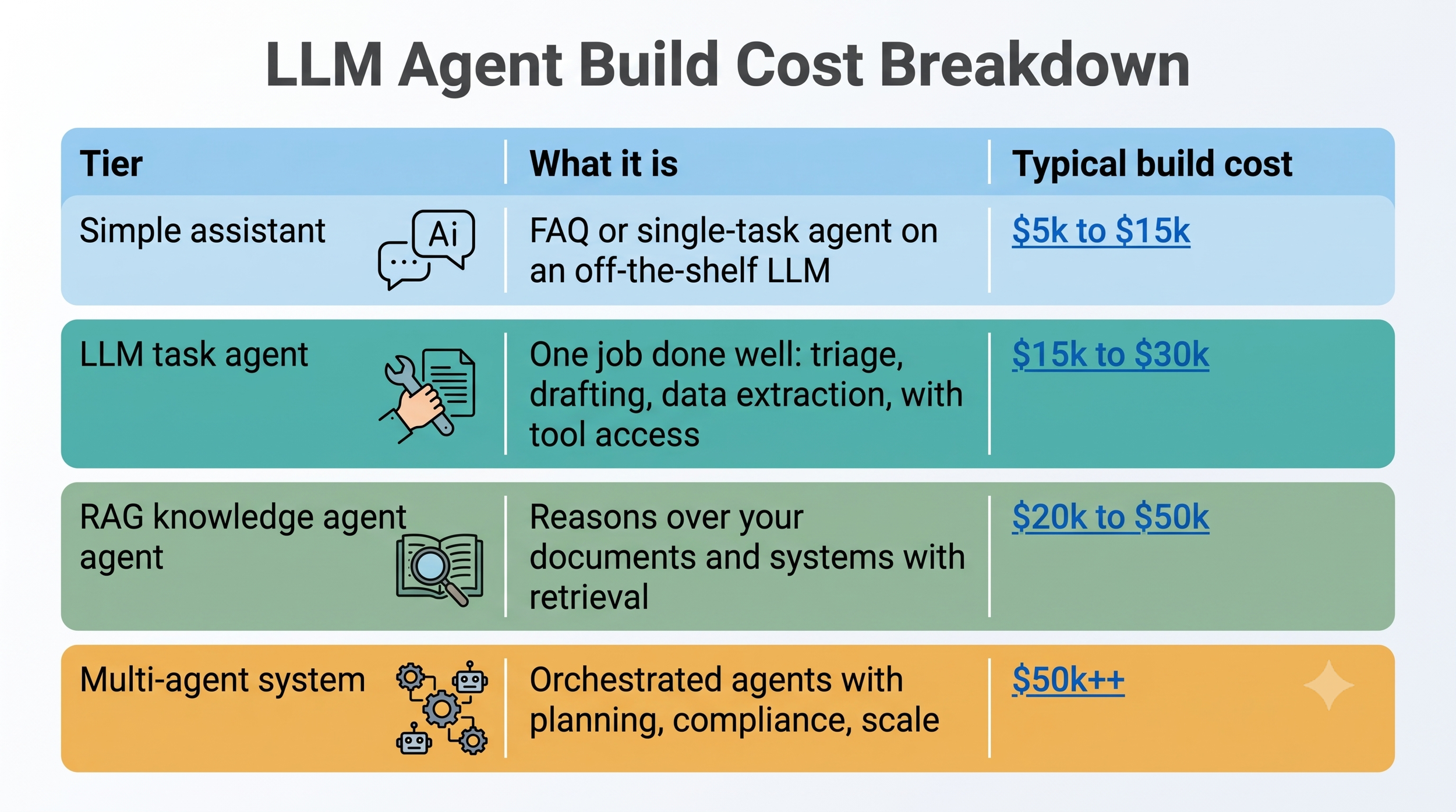
Let's talk actual numbers, because "it depends" is not a budget line. Based on 2026 market rates, custom AI agent builds cluster into four tiers.
Bots and Brand Works
Three cost truths that vendors mention less often:
Integration is the real budget-eater. For enterprise deployments, integration engineering and QA/safety testing together often account for 40 to 60% of total build cost. The LLM is the cheap part. Wiring it safely into your CRM, ERP and that one system from 2008 nobody wants to touch is the expensive part. When you get quotes, scrutinise the integration line, not the AI line.
Building is a subscription too. A production agent serving real users typically costs $3,200 to $13,000 per month to operate, covering LLM API usage, infrastructure, monitoring and ongoing tuning. A sensible three-year budget for an $80k build is closer to $230k to $320k all-in. Anyone comparing an $80k build against a $500/month platform subscription without the operating line is comparing wrong.
Data preparation hides in every estimate.Cleaning, structuring and integrating data typically accounts for 20 to 30% of total AI project cost. If your knowledge base is a decade of inconsistent SharePoint folders, budget for the cleanup or the agent will faithfully learn your mess.
Against those numbers, platform costs look tiny, and for many use cases they genuinely are the right answer. Ready-to-deploy agents hold roughly 77% of the US AI agent market precisely because you can be live in days. The catch: subscription fees are often only about 30% of true total cost once integration, compliance and API usage are counted. Whichever route you take, the honest comparison is three-year total cost of ownership against three-year value, which brings us to the maths.
AI Automation ROI Calculator
You do not need a consultant to estimate automation ROI. You need four numbers and ten minutes.
The formula:
ROI % = ((Hours saved per month × loaded hourly rate × 12) − (Monthly running cost × 12) − Setup cost) ÷ ((Monthly running cost × 12) + Setup cost) × 100
Step 1: Hours saved per month. Count the tasks the automation takes over, multiply by minutes per task and monthly volume. Be conservative: agents rarely take 100% of a task. If the agent handles 70% of tickets and humans review 20% of those, model exactly that.
Step 2: Loaded hourly rate. Salary plus overheads, usually salary × 1.3 to 1.4, divided by working hours. A £45k operations role is roughly £30/hour loaded.
Step 3: Honest costs. Setup (build fee or your team's time) plus monthly running costs (subscriptions, LLM usage, hosting, maintenance).
Step 4: The realisation discount. This is where most business cases quietly lie. Hours saved are not cash saved unless you redeploy the capacity, avoid a hire, or grow output. Credible calculators discount capacity value by 30 to 50% unless a specific headcount or growth action is planned. Applying that discount voluntarily makes your business case bulletproof in front of a CFO.
A worked example. A mid-size firm automates support triage with a RAG agent. It deflects 1,200 tickets a month at 12 minutes each: 240 hours. At £28/hour loaded that is £6,720/month of capacity, discounted 40% to £4,032 because only part of it converts to a delayed hire. Build cost £90,000; running cost £4,000/month.
Year one: £48,384 value against £138,000 cost. ROI: negative 65%. Payback is not in year one, and that is normal for custom builds.
Three years: £145,152 value against £234,000 cost, still negative on capacity alone. The case only clears when you add the second value bucket: faster response times lifting retention, or the same agent extended to sales enquiries. This is why single-use-case custom agents are risky and platform pilots make sense first.
Same example on n8n at £600/month total with £15k setup: three-year cost around £36,600 against £145,152 value. ROI: roughly 296%. Payback inside five months.
The benchmarks say well-executed automation lands between these poles: median ROI of around 300% over three years, payback of 3 to 6 months for focused workflow automations and 12 to 24 months for enterprise-wide rollouts, and surveys reporting average agentic AI ROI around 171%, with 74% of executives achieving ROI within the first year.
The lesson from the worked example is not "custom is bad." It is: sequence matters. Prove the value cheaply, then invest in custom where the proven value justifies it. If you want this done properly for your numbers, Bots and Brand Works runs this exact calculation as part of every automation audit, with your volumes and your rates rather than industry averages.
Enterprise AI Case Studies
Theory is nice. Here is what actually happened when large enterprises deployed agents, including the uncomfortable parts.
Klarna: the triumph and the walk-back. The fintech's AI assistant became the poster child of agentic AI, reportedly doing the work of around 850 agents with roughly $60M in annual savings by late 2025. Then the sequel: in May 2025 Klarna began rehiring human agents after customers pushed back on generic answers and poorly handled edge cases, with the CEO admitting the company cut too far. The lesson is not "agents fail." Klarna kept the AI and rebalanced. The lesson is that fully removing humans from judgement-heavy, brand-sensitive work is a step too far, and hybrid designs with escalation paths are the durable pattern.
Morgan Stanley: the unglamorous jackpot. The bank's DevGen.AI agent reviewed over 9 million lines of legacy code and saved developers an estimated 280,000 hours, freeing 15,000 developers from manual code translation. Notice what this is: an internal, low-drama, high-volume use case with no customers in the blast radius. That profile is exactly where agents shine earliest.
The pattern across the market. Analyses of 2025-2026 deployments consistently find the same five categories producing verified ROI: customer service automation, contract review, supply chain orchestration, code modernisation and fraud detection. Common threads: each has high volume, measurable outcomes, clear escalation paths, and started narrow before expanding. Meanwhile 39% of adopters report productivity at least doubling on targeted workflows.
And the failures. Gartner's projection that 40% of agentic AI projects will be cancelled by end of 2027 deserves as much attention as the wins. Post-mortems point to recurring causes: no baseline measurement (so ROI could never be proven), agents pointed at broad fuzzy goals instead of narrow processes, and governance bolted on after launch rather than designed in. Every one of those is avoidable at the planning stage, which is the cheapest place to avoid anything.
Future of Agentic AI
Where does this go next? Four shifts look highly likely between now and 2028, and each has a practical implication for decisions you make today.
1. Agents move from apps you buy to features inside everything. With Gartner expecting 40% of enterprise applications to embed task-specific agents by end of 2026, your CRM, helpdesk and ERP will each arrive with their own agents. The new enterprise problem becomes orchestration: getting your vendor agents, platform agents and custom agents to cooperate rather than trip over each other. Companies with a coherent automation architecture will absorb this easily; companies with forty disconnected Zaps will not.
2. Interoperability standards become the plumbing. Protocols like MCP (Model Context Protocol), which standardise how agents connect to tools and data, are doing for agents what APIs did for SaaS. Practical implication: when you build custom today, build against open protocols so tomorrow's agents can reuse today's integrations.
3. Governance goes from afterthought to procurement requirement. As agents take actions with real-world consequences, auditability, action-level permissions and human-in-the-loop controls are becoming standard enterprise procurement questions, the way security reviews became standard for SaaS. Teams that can answer "what exactly can your agent do, and who approved it?" will sail through; teams that cannot will stall in legal review.
4. The winners consolidate around hybrid architectures. The market data points one direction: deterministic automation and agentic AI converge into a single stack where workflows provide the reliable rails and agents provide the judgement. Gartner's $450 billion by 2035 scenario is built on agents becoming a standard software layer, not a separate category.
The honest caveat: this is a fast-moving space and specific predictions age badly. What will not age badly is the underlying decision framework in this guide. Match rules-based work to workflow automation, judgement work to agents, prove value narrow before scaling wide, and keep humans in the loop where stakes are high. That framework survives every model release.
The Bottom Line
Workflow automation and agentic AI are not rivals; they are different layers of the same stack. Workflow tools like Zapier, Make and n8n are your rails: cheap, reliable, perfect for the predictable 80% of work. Agentic AI is your judgement layer: more expensive, more powerful, and the only way to automate the messy 20% that still eats your team's time. The enterprises getting this right in 2026 are not choosing one; they are sequencing both, proving ROI on platforms before investing in custom, and keeping humans in charge of the moments that matter.
If you want help working out your own sequence, that is exactly what we do. Bots and Brand Works builds automation stacks across this whole spectrum, from n8n workflows to fully custom AI agents, and every engagement starts with the same honest question: what does the ROI maths say for your business? Book a free automation audit and we will run your numbers with you.
Frequently Asked Questions
What is the difference between agentic AI and workflow automation? Workflow automation follows fixed, human-designed rules: when X happens, do Y, every time. Agentic AI uses a large language model to reason toward a goal, choosing its own steps and adapting to new situations. Automation executes decisions already made; agents make decisions within boundaries you set.
Is Zapier an AI agent? Zapier's core product is rules-based workflow automation, not agentic AI. Zapier does offer a separate product, Zapier Agents, which adds AI-driven behaviours, billed separately from the main plan. It suits lightweight personal-productivity agents rather than complex enterprise agent systems.
How much does a custom AI agent cost in 2026? Typical build costs range from $10k to $50k for a simple assistant, $50k to $180k for production single agents with retrieval, and $150k to $400k+ for multi-agent systems. Add $3,200 to $13,000 per month in running costs, and expect integration and testing to consume 40 to 60% of the build budget.
Should my company use n8n or build custom AI agents? Start with n8n if your use case is departmental, volumes are moderate, and you have some technical capability; it is the fastest route to a working agent and proven ROI. Move to custom when the agent touches regulated data, core revenue processes, needs deep legacy integration, or when optimisation savings at scale justify engineering investment.
What ROI can enterprises expect from AI automation? Benchmarks for well-implemented automation show median ROI around 300% over three years, with payback of 3 to 6 months for focused workflow automation and 12 to 24 months for enterprise-wide agentic rollouts. Results depend heavily on measuring a baseline first and discounting hours saved that do not convert to redeployed capacity.
Will AI agents replace workflow automation tools? No. The two are converging into hybrid stacks: deterministic workflows handle high-volume predictable tasks cheaply and auditable, while agents handle judgement-heavy, unstructured work. Every major platform (n8n, Zapier, Make) now ships both, and enterprise architectures increasingly use workflows as rails that agents plug into.
Need Help Implementing AI?