

What Is MCP (Model Context Protocol)? A Plain-English Guide for Business Owners
MCP (Model Context Protocol) is the standard that lets AI connect to your business tools without expensive custom integrations. Here is what it is, why it matters, and how to use it, explained without the jargon.
In November 2024, a technical announcement quietly went out that most business owners never saw. No flashy demo, no viral video. Just a new open standard called the Model Context Protocol, or MCP.
Less than two years later, it has been adopted by OpenAI, Google, Microsoft and pretty much everyone else who matters in AI. Thousands of tools now speak it. And if you are paying anyone to connect AI to your business systems, it is quietly reshaping what that work should cost.
That last part is why this article exists. You do not need to understand MCP at a technical level, the same way you do not need to understand how contactless payment works to know it changed the queue at the coffee shop. But you should understand what it does, because it directly affects two things you care about: how much AI projects cost, and how locked in you are to any one vendor.
So let's do this properly, in plain English, one analogy at a time.
What Is the Model Context Protocol?
MCP is a common language that lets AI models connect to tools, files and data sources in a standard way.
That sentence is accurate but bloodless, so here is the analogy that has stuck across the entire industry, because it is genuinely the best one.
MCP is USB-C for AI.
Remember the drawer of cables? Every phone, camera and gadget once had its own special charger. Travelling meant carrying a bag of adapters, and losing one meant a dead device. Then USB-C arrived: one standard plug, and suddenly one cable charges your phone, your laptop and your headphones.
Before MCP, connecting an AI to a business tool worked like that drawer of cables. Want your AI assistant to read your calendar? Custom integration. Check your CRM? Another custom integration. Search your documents? A third one, built differently again. Every connection was bespoke, which meant every connection cost developer time to build and more time to maintain when something changed.
MCP replaces all of that with one standard socket. A tool exposes an "MCP server" (its socket), an AI application has an "MCP client" (its plug), and any compatible AI can connect to any compatible tool. Build the connection once, use it everywhere.
Why Should a Business Care?
Fair question. Standards and protocols sound like something for the IT crowd. Here is why this one lands on your desk.
It collapses the cost of connecting AI to your business. The expensive part of most AI projects was never the AI. It was the plumbing: getting the AI to talk to your calendar, your CRM, your accounting software, your file storage. MCP turns much of that bespoke plumbing into off-the-shelf parts. Thousands of ready-made MCP servers already exist for popular business tools, from Google Drive and Slack to Stripe and HubSpot. If your tools are on that list, a connection that once took weeks of custom work can now take hours of configuration.
It weakens vendor lock-in. Because MCP is an open standard rather than one company's product, connections built on it are not tied to one AI provider. If you build your integrations the old bespoke way and later want to switch AI models, you rebuild everything. Build on MCP, and switching the AI is more like unplugging one device and plugging in another. The sockets stay.
It is a question you can now ask vendors. When an agency quotes you for AI work, "are you using MCP for the integrations, and if not, why not?" is a completely fair question in 2026. Sometimes there is a good reason (a legacy tool with no MCP server, unusual security requirements). But the question alone signals that you cannot be charged bespoke prices for standard work. Consider it the automation equivalent of asking a builder whether they are using standard-size fittings.
How Does MCP Work?
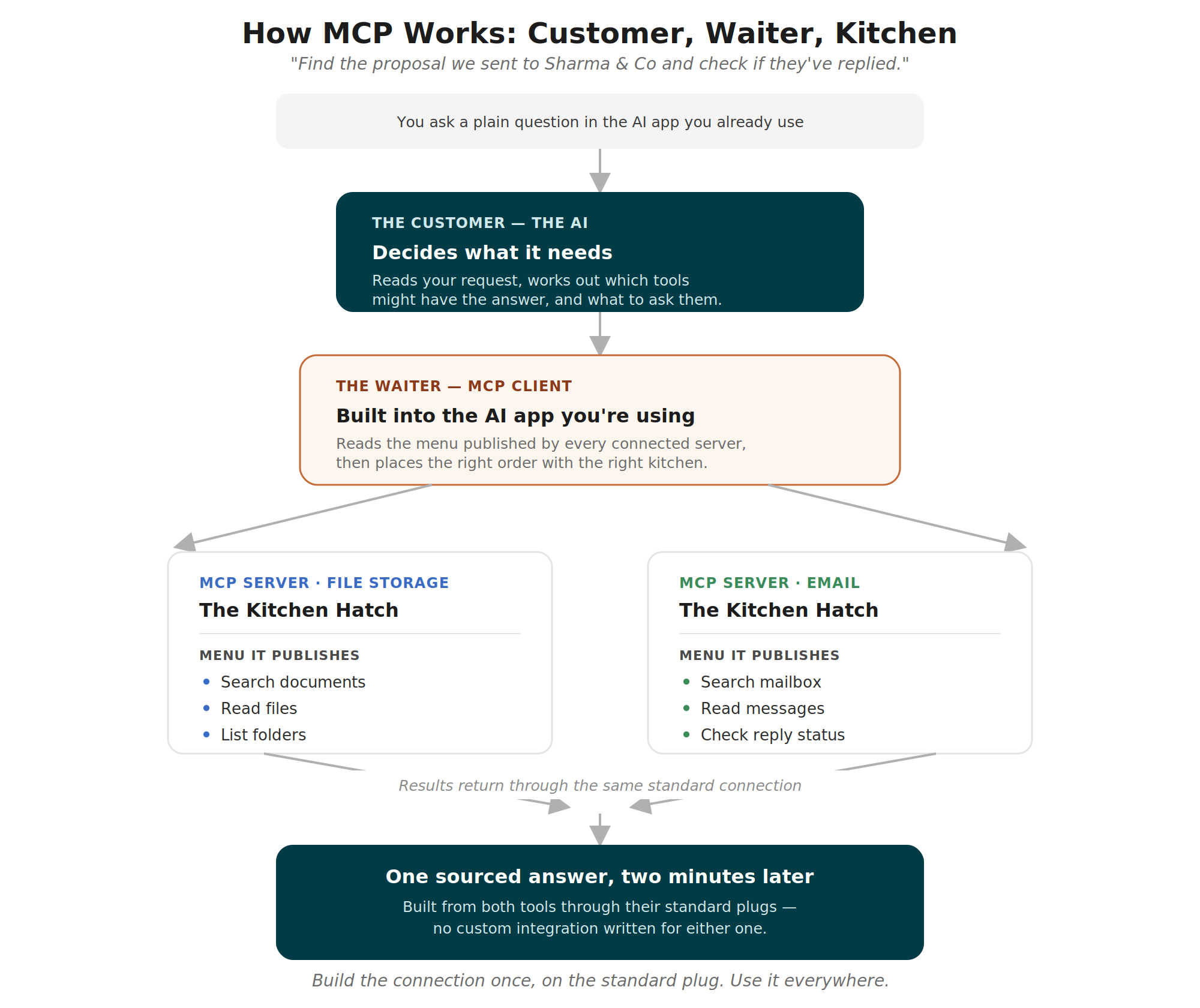
You do not need the technical internals, but a five-minute mental model helps you follow any conversation about it. Three pieces, one restaurant.
The MCP server is the menu and the kitchen hatch. Each tool (your CRM, your calendar, your file storage) runs a small piece of software called an MCP server. It publishes a menu of what it offers: "I can look up contacts, I can create deals, I can search notes." It also handles the actual work when an order comes in.
The MCP client is the waiter. The AI application you use (Claude, ChatGPT, or a custom assistant your agency builds) contains an MCP client. It reads the menus from every connected server, so the AI knows exactly what it can ask each tool to do.
The AI is the customer who orders. When you tell your assistant "find the proposal we sent to Sharma & Co and check if they have replied," the AI looks at the available menus, orders a document search from the file storage server and a mailbox search from the email server, gets the results back, and gives you the answer.
Three things worth noticing in that flow. First, the AI discovers what tools can do automatically, by reading the menu, rather than a developer hard-coding every possibility. Second, each tool only exposes what its menu offers, nothing more. And third, the whole exchange is standardised, so adding a new tool means adding a new menu, not renovating the restaurant.
There is one more term you will hear: remote versus local MCP servers. A local server runs on the same machine as the AI application, useful for private files. A remote server runs in the cloud, which is how most business tools offer theirs. From your point of view the difference is mostly about where data travels, which your provider should be able to explain in one sentence.
What Are the Benefits?
Speed to value. Integration used to be the long, expensive middle of every AI project. With ready-made MCP servers for mainstream tools, pilots that took a quarter can take weeks. The faster the plumbing, the sooner the automation actually saves you time.
Reuse across projects. Connect your CRM via MCP for one automation, and your second and third automations use the same connection free of charge. Integrations become assets, not repeated expenses.
A healthier vendor relationship. Open standards shift power toward the buyer. Your integrations outlive any single AI provider, any single agency, and any single model generation.
A growing ecosystem working in your favour. Because everyone adopted the same standard, every new MCP server released by any company anywhere becomes something your setup can potentially use. You benefit from an industry's worth of work without commissioning any of it.
What Are the Limitations?
Honesty section. MCP is genuinely good news, but it is not pixie dust.
Not every tool has an MCP server yet. Coverage of mainstream software is strong and growing, but that industry-specific system your business has run since 2011 may not have one. Bespoke integration work has not vanished; it has just been pushed to the edges.
A standard plug is not a security policy. MCP includes authorisation as part of the protocol, which is genuinely well-designed. But someone still has to decide what each connection is allowed to do. An MCP server that can read and delete files should not be handed to an AI that only needs to read them. The plug is standard; the judgment about what to plug in remains human. (Our guide to the [AI automation stack] covers this in the authentication and monitoring layers.)
Quality varies. Anyone can publish an MCP server, and thousands of people have. Some are polished official releases from the tool's own maker; some are weekend projects. Part of what you pay a good implementation partner for is knowing which is which.
It moves fast. The protocol is actively evolving, with updates landing regularly. This is healthy for a young standard, but it reinforces a rule we repeat in every article: AI systems need maintenance, so ask every vendor what month thirteen looks like.
How Does MCP Compare to What Came Before?
MCP vs traditional APIs. This is the comparison everyone reaches for, and the answer is: they are not rivals. An API is how software exposes its capabilities; MCP is how AI models discover and use those capabilities in a standard way. Most MCP servers are actually wrappers around existing APIs. If the API is the kitchen, MCP is the standardised menu and ordering system bolted onto it. You want both.
MCP vs plugins and custom connectors. Before MCP, each AI platform had its own plugin format. Build a connector for one platform, and it worked nowhere else. MCP replaced those walled gardens with one format that works across platforms, which is exactly why the platforms themselves gave up fighting it and adopted it.
MCP vs automation tools like Zapier or Make. These solve overlapping but different problems. Zapier-style tools connect apps to each other with fixed rules: when X happens, do Y. MCP connects apps to an AI that can reason: look at the situation, decide what is needed, then use the tools. For simple, predictable hand-offs, the fixed-rule tools remain brilliant and cheap. When the workflow needs judgment, MCP-connected AI takes over. Many businesses run both, and there are even MCP servers for Zapier itself, which rather proves the point. We unpack that whole decision in our pillar guide: Agentic AI vs Workflow Automation.
Real-World Examples
The solicitor's file finder. A small legal practice connects its document storage and calendar through two MCP servers. Fee earners ask an assistant things like "pull everything we have on the Hendersons' lease renewal and check when we last met them." What used to be ten minutes of folder-diving is now one sentence. No custom integration was written; both servers already existed.
The e-commerce owner's morning question. A shop owner connects Stripe and her helpdesk via MCP. Each morning she asks one question: "anything unusual overnight?" The AI checks payments, refunds and new tickets through the standard connections and gives a two-line answer. The build took an afternoon.
The agency that stopped rebuilding. A marketing agency used to rebuild the same CRM and calendar integrations for every client project, billing the time each round. After moving to MCP-based connections, the plumbing became reusable across clients. Projects got cheaper to deliver, which made them cheaper to buy. That is the standard doing exactly what standards are for.
How Do I Implement MCP in My Business?
You will likely never install an MCP server with your own hands, and you do not need to. Your implementation checklist is about decisions, not code.
Step 1: List your core tools. Email, calendar, CRM, accounting, file storage, project management. The five to eight systems your business actually runs on.
Step 2: Check MCP coverage. For each tool, check whether an official or well-maintained MCP server exists. Official directories and your implementation partner can answer this in an hour. Strong coverage means cheap connections; gaps show where the real integration budget will go.
Step 3: Start where coverage meets pain. Pick one workflow (see our [AI automation stack] guide for how to choose) where the tools involved all have good MCP servers. That is your lowest-cost, fastest first win.
Step 4: Set the permissions deliberately. For every connection, decide: read-only or read-and-write? Which accounts? Which data? Grant the minimum that the workflow needs. This ten-minute conversation is the cheapest security work you will ever buy.
Step 5: Ask the vendor questions. Whoever builds your automation, ask: Are the integrations MCP-based? Are the servers official or community-built? What happens when the protocol updates? Clear answers to those three tell you most of what you need to know about the vendor.
Frequently Asked Questions
-
No. It is a free, open standard, like Wi-Fi or USB. What you pay for is the AI models, the tools you already use, and any implementation help. The protocol itself costs nothing.
-
Anthropic (the makers of Claude) introduced it in November 2024 and open-sourced it. It has since been adopted industry-wide and is developed in the open, which is precisely why competitors were comfortable adopting it.
-
The protocol includes proper authorisation mechanisms, and connections can be restricted to exactly the access they need. In practice, security depends less on the protocol and more on the decisions around it: which servers you trust, what permissions you grant, and whether anyone is monitoring. The same is true of every technology you already use.
-
No. It connects to what you already have. Your CRM stays your CRM; MCP just lets an AI use it on your behalf.
-
For plain conversations, no. MCP matters the moment you want the AI connected to your business systems, whether inside those chat apps (both support MCP-based connectors) or in custom automations.
-
The MCP server is the socket on the tool. The agent is the AI that plugs in and acts. If you want the full picture of how agents differ from simple chatbots, we have written a whole article on exactly that: [AI Agents vs Chatbots].
The Takeaway
MCP is one of those rare pieces of infrastructure that is boring in exactly the right way. Like standardised shipping containers or USB-C, it will never be the exciting part of your AI story. It just quietly makes everything cheaper, faster and less locked in.
For your business, the practical translation is this: connecting AI to your existing tools has stopped being the expensive, bespoke part of the project. If your quotes have not caught up with that fact, now you know which question to ask.
Bots and Brand Works builds AI automation for small and medium businesses on open standards like MCP, so the plumbing you pay for once keeps working for every project after. Curious which of your tools are already MCP-ready? Send us your list and we will check, no strings attached.
Need Help Implementing AI Solutions?
Resources and Further Reading
Related: Agentic AI vs Workflow Automation: The 2026 Enterprise Guide
Related: [The AI Automation Stack Explained](
Related: [AI Agents vs Chatbots](
Model Context Protocol (official site): Click Here
Anthropic's MCP announcement: Click Here
MCP specification and docs: Click Here
Official MCP server registry: Click Here