

What Is an AI Agent? The Anatomy, Piece by Piece
Open the bonnet on an AI agent: the reasoning engine, tools, memory, feedback loop and boundaries that make one work, how a single task flows through them, and what to check before you buy one.
You can use a car for years without knowing what a crankshaft does. But the day you buy one, a little mechanical literacy changes everything: you stop nodding at the salesperson and start asking the questions that reveal what is actually under the paint.
AI agents have reached that moment for business buyers. The demos are shiny, the word "agent" is on everything, and the difference between a solid one and a flashy liability is entirely internal. So this article opens the bonnet: the five components every real agent has, how a single task actually flows through them, where each component fails, and the checks that tell you whether a vendor's agent has all its parts.
(If you want the concept before the mechanics, start with [What Is Agentic AI?]; if you want the buying comparison against chatbots, that is [AI Agents vs Chatbots]. This article is the engineering tour, in plain English.)
The Five Components of Every Real Agent
1. The reasoning engine: the brain. A large language model (Claude, GPT or a peer) that interprets the goal, breaks it into steps, and decides what to do next at every junction. This is the component you rent rather than own, paying per use, and the one everything else is built around. Worth knowing: good agent builds often use different models for different moments, a cheap fast one for routine steps and a stronger one for the judgment calls, the way a firm staffs juniors and seniors.
2. Tools: the hands. Connections to real systems: the CRM lookup, the email send, the calendar write, the payment API. Each tool is a specific capability with specific permissions, increasingly plugged in through the open MCP standard (the USB-C of AI, explained in our [MCP guide]). An agent's real-world usefulness is roughly the quality of its toolset; its real-world risk is roughly the breadth of it. [Tool Calling Explained] covers the mechanics.
3. Memory: the notebook. What the agent knows beyond the current moment: the conversation so far, the customer's history, the business rules, what it already tried on this task. Memory is layered (working, long-term, and knowledge retrieved from your documents), and its design quietly determines whether the agent feels competent or amnesiac. The full tour is in [Agent Memory Explained].
4. The feedback loop: the eyes. After every action, the agent observes the result: did the API call succeed, does the data look sane, did the step achieve what it was for? Then it adjusts: retry differently, flag the oddity, choose another path. Upgraded with deliberate self-review, this becomes [reflection], the single biggest reliability difference between production agents and conference demos.
5. Boundaries: the job description. Scope ("returns under $200"), refusals ("never discuss legal matters"), permissions per tool, spending limits, and the escalation path to a human. Boundaries are not a restraint bolted onto the agent; they are a component of it, as much as the brain. An agent without them is not more powerful; it is unfinished. ([AI Agent Governance] is the full manual; [Human Approval] covers the gates.)
The analogy that holds it together: an agent is a capable new hire, anatomically. Brain, hands, notebook, eyes, and a signed job description. Interview a human candidate and you assess all five; evaluate an agent and you should too, because the failure of any one produces a recognisable workplace disaster: clever but handless (all talk), handy but blind (accidents), sharp but amnesiac (repeats itself), and brilliant but boundaryless (the intern with the master key).
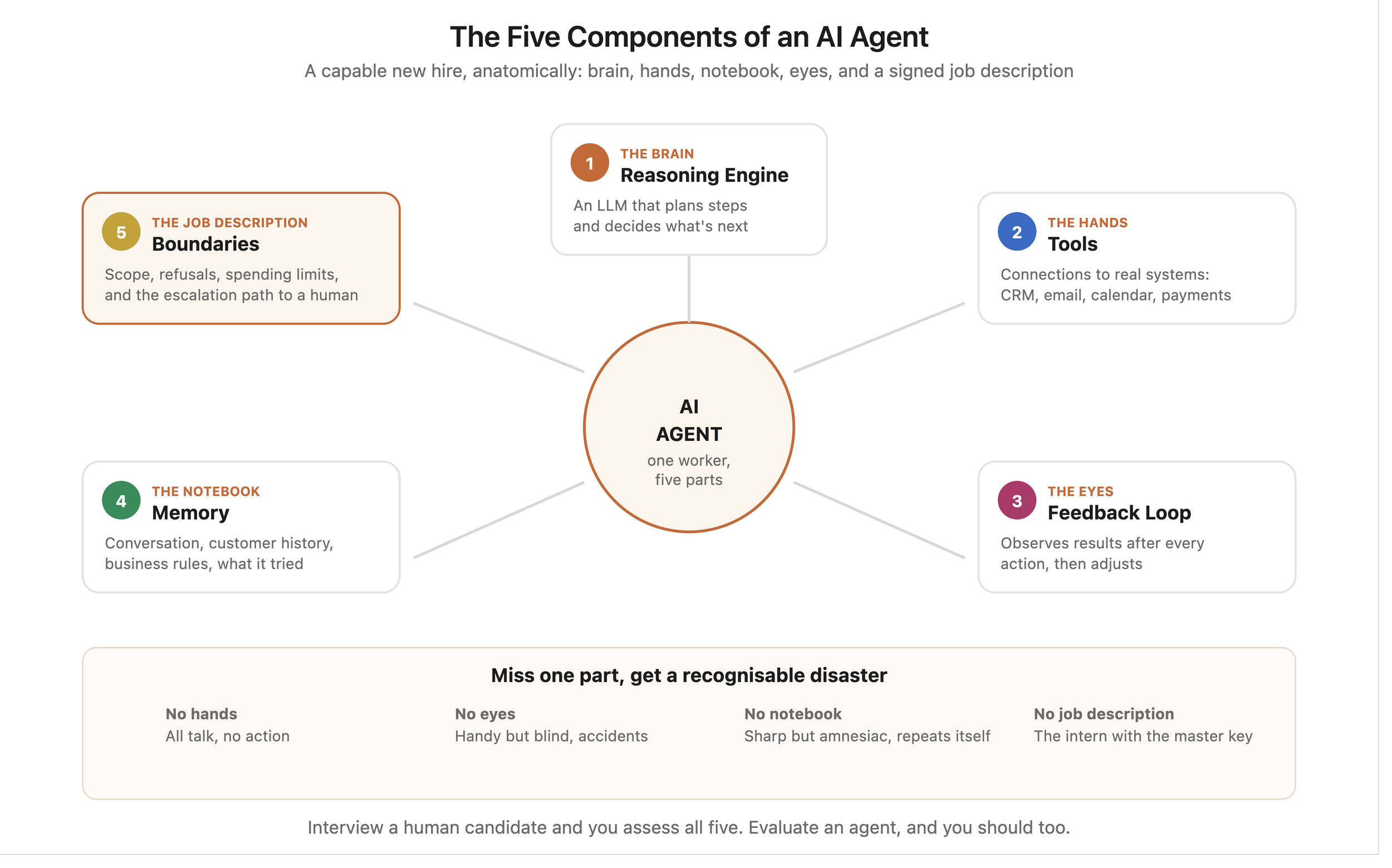
The 5 Components of an AI Agent
How a Task Actually Flows: One Return Request, Start to Finish
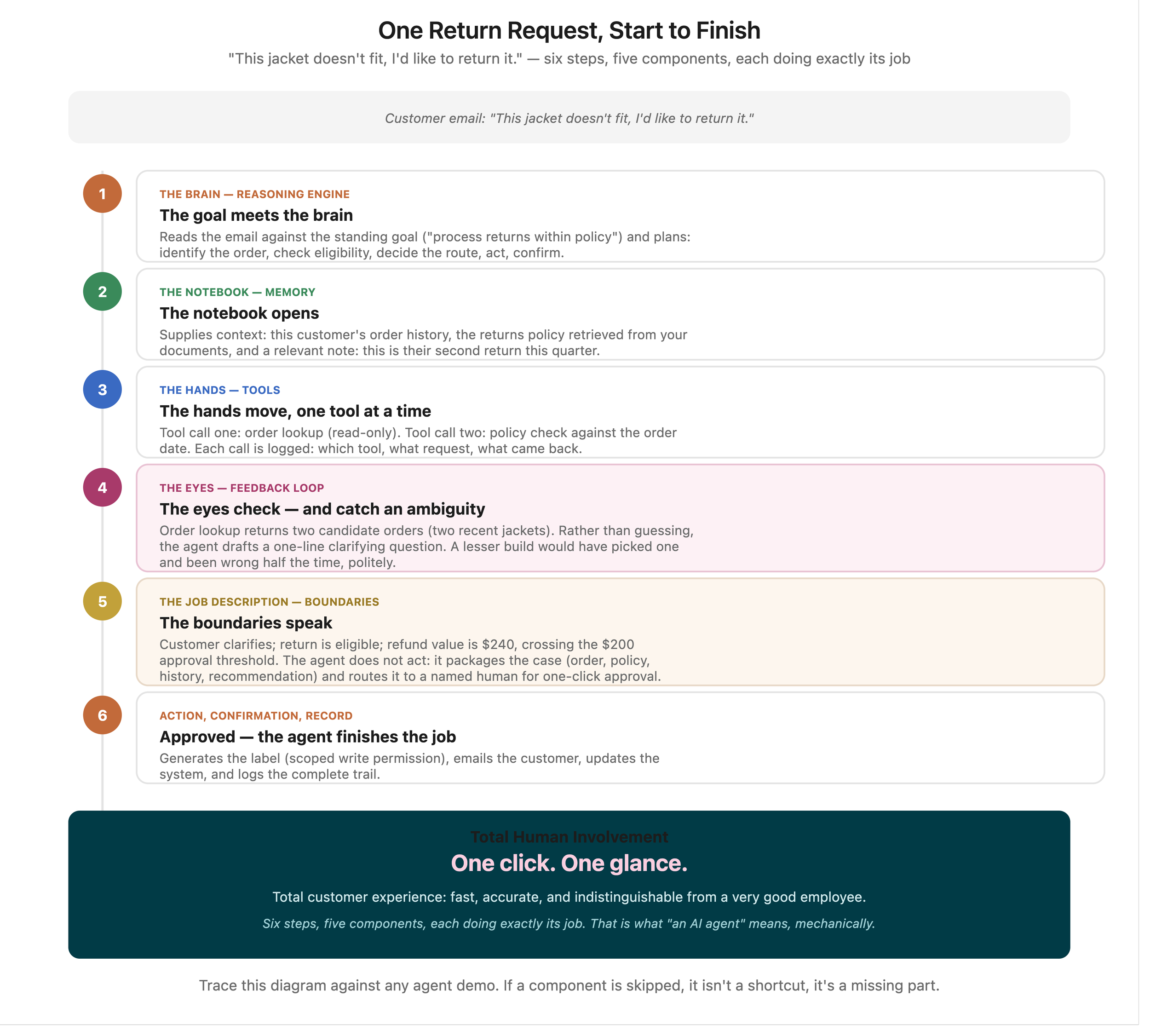
Anatomy is clearer in motion, so let's follow one task through all five components. A customer emails: "This jacket doesn't fit, I'd like to return it."
Step 1: The goal meets the brain. The reasoning engine reads the email against its standing goal ("process return requests within policy") and plans: identify the order, check eligibility, decide the route, act, confirm.
Step 2: The notebook opens. Memory supplies context: this customer's order history, the returns policy (retrieved from your documents via the [RAG pattern]), and a relevant note: this is their second return this quarter.
Step 3: The hands move, one tool at a time. Tool call one: order lookup (read-only permission). Tool call two: policy check against the order date. Each call is logged: which tool, what request, what came back.
Step 4: The eyes check. The order lookup returned two candidate orders (the customer has two recent jackets). The feedback loop catches the ambiguity: rather than guessing, the agent drafts a one-line clarifying question to the customer. A lesser build would have picked one and been wrong half the time, politely.
Step 5: The boundaries speak. Customer clarifies; the return is eligible; the refund value is $240. That crosses the $200 approval threshold, so the agent does not act: it packages the case (order, policy clause, history, recommendation) and routes it to a named human for one-click approval. ([Human Approval] explains why this gate design is the whole art.)
Step 6: Action, confirmation, record. Approved. The agent generates the label (write permission, scoped), emails the customer, updates the system, and logs the complete trail. Total human involvement: one click and one glance. Total customer experience: fast, accurate, and indistinguishable from a very good employee.
Six steps, five components, each doing exactly its job. That is what "an AI agent" means, mechanically.
Why Should a Business Buyer Know the Anatomy?
Because demos show the brain and hide the rest. Every demo showcases reasoning: the impressive plan, the fluent reply. What separates production agents from demos is everything else: the memory design, the feedback handling, the boundary work. Anatomy literacy redirects your attention to where quality actually lives.
Because the anatomy is the quote. When a vendor prices an agent build, you are paying for components: tool integrations (usually the biggest line, per our [pricing guide]), memory infrastructure, and governance plumbing. Understanding the parts is understanding the invoice.
Because failure diagnosis follows the anatomy. When an agent misbehaves, the fix depends on which organ failed: wrong facts is a memory problem, wrong action is a boundary problem, gave-up-too-easily is a feedback-loop problem, nonsense plan is a reasoning problem (often just a model-tier problem). Teams that know the anatomy fix in days what mystery-box owners abandon in months.
The Diagnostic Table: Symptom to Organ
Anatomy earns its keep the day something misbehaves, so here is the troubleshooting map, symptom by symptom.
"It stated something untrue about our business." Memory, usually the library layer: a stale or missing document, or retrieval fetching the wrong page. Fix the document or the retrieval, not the model. If it invented something no document covers, the missing "say I don't know" instruction is the culprit.
"It forgot what we discussed earlier." Memory, working layer: notepad overflow with careless summarisation. Across sessions, absent long-term memory. Both are build decisions, both fixable.
"It did the steps in a strange order, or went in circles." The brain's planning, missing route discipline: step budgets, loop detection, an upfront plan. [Agent Planning] covers the fixes.
"It gave up the moment something failed." Feedback loop too timid: no retry logic, no alternative paths. The opposite symptom ("it kept hammering a broken API for an hour") is the same organ with no budget.
"It did something it should never do." Boundaries: either the scope was never written, or the toolbox was overstocked (a tool it should not hold), or a gate was missing. This one is a governance incident, not a bug: fix the boundary, then ask why it was absent.
"It is right but slow and expensive." Usually the brain doing all steps on the premium model, or wandering plans burning tokens. Model routing and planning discipline are the levers.
"It works but nobody trusts it." Not an organ at all: missing evidence. Baselines, logs and catch records ([reflection]'s output) are what convert a working agent into a trusted one.
Tape this table next to any agent deployment and most "the AI is broken" conversations become fifteen-minute fixes with the right person. Mystery is optional.
What Are the Limitations of Even a Complete Agent?
Competence is narrow. All five components are built around a job. The superb returns agent knows nothing about your invoices; agents generalise across tasks about as well as job descriptions do. Bigger goals need teams of specialists, which is the [Multi-Agent Systems] chapter.
The brain is rented and probabilistic. Reasoning engines occasionally reason wrongly, with confidence. The surrounding anatomy (grounded memory, feedback checks, boundaries, human gates) exists precisely because the brain alone cannot be fully trusted, and never will be. Design assumes fallibility; that is the design working, not failing.
Every component ages. Models update, APIs change, policies evolve, memory fills with the stale. An agent is a system to maintain, not a purchase to forget: the month-thirteen question applies to every organ.
Cost lives in the loop. Each reasoning step burns tokens; long feedback loops on hard tasks burn many. Well-built agents route easy steps to cheap models and reserve the expensive thinking, which is invisible in demos and very visible in year-one running costs.
The Buyer's Anatomy Check
Six questions, one per component plus one for the whole:
- Brain: which model(s), and can the routine steps run on cheaper ones?
- Hands: exactly which tools, with which permissions, over which standard (MCP or bespoke)?
- Notebook: what does it remember across sessions, where does that live, and is the knowledge grounded in OUR documents?
- Eyes: show me what happens when a tool call fails or returns nonsense.
- Job description: show me the written scope, the gated actions, and yesterday's audit log.
- The whole: who maintains each part, and what does month thirteen look like?
A vendor fluent in all six is selling an agent. Fluent in one is selling a demo with a brain.
Frequently Asked Questions
What is an AI agent in simple terms? Software that completes tasks toward a goal: a reasoning engine (brain) plans the steps, tools (hands) act on real systems, memory (notebook) holds context, a feedback loop (eyes) checks results, and boundaries (job description) keep it inside its authority with humans on the exceptions.
How is an AI agent different from ChatGPT? ChatGPT in a chat window is a brain alone: brilliant conversation, no hands, no persistent job. An agent wraps that same class of brain with tools, memory, feedback and boundaries so it can actually complete work. The model is one component of five, not the product.
What are the main components of an AI agent? Five: the reasoning engine (an LLM), tool connections to real systems, layered memory, a feedback loop that observes and adjusts, and explicit boundaries with escalation paths. Production quality lives mostly in the last four, which demos rarely show.
Do AI agents make mistakes? Yes, and well-built ones are designed around that fact: grounded memory reduces wrong facts, feedback loops catch failed steps, boundaries cap the damage of wrong actions, and human gates hold the consequential calls. The realistic promise is not zero errors; it is small, caught, reversible, explainable ones.
How much does an AI agent cost to build? For SMB single-workflow agents: typically £8,000 to £25,000 to build plus running and maintenance, with tool integrations usually the largest line (full tiers in [How Much Does AI Automation Cost?]). The anatomy explains the spread: more tools, richer memory and stricter governance all add parts.
Can I build an AI agent without coding? Increasingly yes, for moderate cases: platforms like n8n ship visual agent components (brain node, tool nodes, memory), covered in our [n8n vs Zapier vs Make] comparison. The anatomy stays identical; only the assembly method changes. Complex, regulated or high-volume agents still justify custom builds, per the pillar's decision rules.
How long does it take to build an AI agent? For a bounded single-workflow agent with the full anatomy: typically four to eight weeks, of which the brain is days and everything else is the schedule: tool integrations (longest, and dependent on your systems' APIs), memory design, boundary definition and the shadow-testing period that earns launch. The [90-Day Roadmap] wraps this in the audit and measurement that make the build worth doing. Timelines quoted in days are quoting a demo; timelines quoted in quarters, for one workflow, deserve a second opinion.
Do I need a different agent for every task? Broadly, one agent per coherent job description, which usually means per workflow: the returns agent, the invoice-chasing agent, the intake agent. They share plumbing (connections, memory infrastructure, governance patterns), which is why the second agent costs roughly half the first. Stretching one agent across unrelated jobs produces the fuzzy scope that the [failure statistics] punish; hiring a team of specialists is the [multi-agent] chapter.
The Takeaway
An AI agent is not magic and not a model: it is five parts working as one worker. Brain to plan, hands to act, notebook to remember, eyes to check, and a job description that says where it stops and a human begins.
Learn the anatomy once and everything downstream gets easier: demos stop dazzling you, quotes start making sense, failures become diagnosable, and the six buyer's questions do the rest. The bonnet is open for the rest of the series: [memory], [planning], [reflection], [tool calling] and [the human gates], one organ at a time.
Bots and Brand Works builds agents with all five parts and shows you each one working before launch: the scope, the permissions, the logs, the gates. Considering a build or holding a quote? Send it over and we will tell you which components it prices and which it forgot.
Need Help Implementing AI?
Resources and Further Reading
- Pillar article: Agentic AI vs Workflow Automation: The 2026 Enterprise Guide
- Related: Tool Calling Explained [add internal link]
- Related: What Is Agentic AI?
- Also in this series: Agent Memory · Agent Planning · Reflection · Human Approval [add internal links]
- Anthropic: Building effective agents: Click Here
- Model Context Protocol: Click Here