

AI Automation Without Zapier: How Companies Are Building Automation in 2026
More companies are building AI automation without Zapier, Make or n8n. Here are the five approaches replacing drag-and-drop workflows in 2026: agent SDKs, MCP, skills, durable execution and computer-use agents, explained in plain English.
For about a decade, "automating your business" meant one thing: open Zapier, Make or n8n, drag a trigger onto a canvas, connect a few boxes, and watch data move between your apps while you got on with your day. It was a genuine revolution. A five-person team could suddenly run like a fifty-person one.
Then AI arrived in the workflow, and the canvas started to creak.
Here is a small sign of how fast things are moving. In July 2026, the team behind the Model Context Protocol (the standard that lets AI tools plug into business software) reported that its main software kits were being downloaded close to half a billion times a month. In the same update, the observability company Honeycomb said that nearly 20% of its monthly interactive queries were now made by AI agents rather than people. One in five. Not a pilot, not a demo: everyday traffic.
So when business leaders ask us, "What is the latest way companies are building automation without these tools?", the honest answer is that a new set of building blocks has quietly matured underneath the drag-and-drop platforms. Some companies are replacing their Zaps entirely. Many more are keeping the simple stuff where it is and building the clever stuff a different way.
This guide explains that different way, and how to decide whether any of it belongs in your business. No code required to follow along.
One framing note before we start. In our pillar guide, Agentic AI vs Workflow Automation, we split automation into two layers: the rails (fixed, rule-following workflows) and the judgment layer (AI agents that decide what to do next). Zapier, Make and n8n were built for the rails. Almost everything in this article is about how companies are building the judgment layer, and in some cases, the rails too, without them.
What Is "AI Automation Without Zapier"?
AI automation without Zapier is the practice of automating business work using AI agents, open connection standards and code-based or plain-language tools, instead of a visual drag-and-drop workflow platform. Rather than drawing every step on a canvas in advance, you describe the goal and the rules, give the AI access to the right tools, and let it work out the steps, with checks and human approval built in.
The easiest way to feel the difference is an analogy.
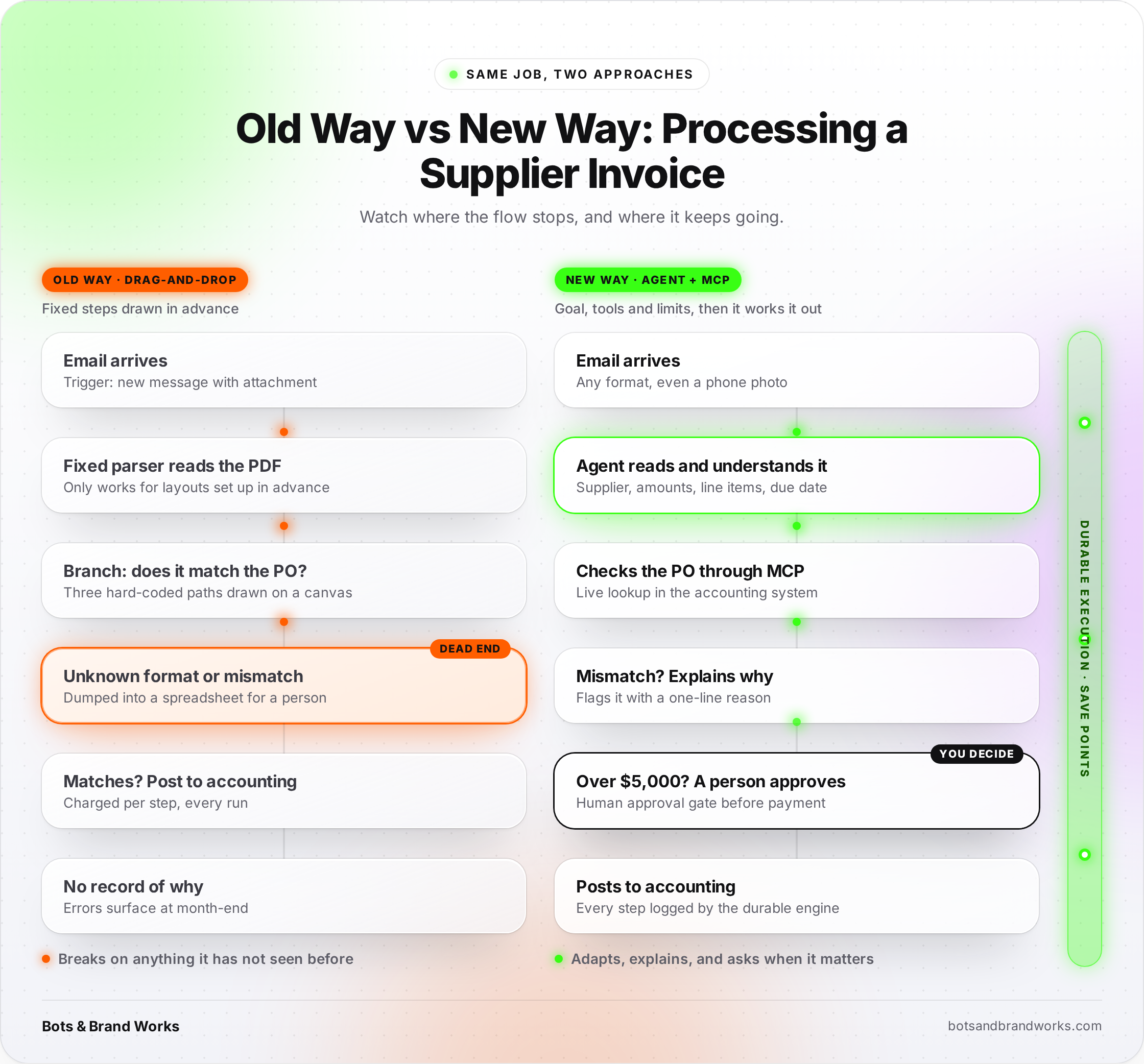
A Zapier workflow is like a train on tracks. It is fast, cheap to run and wonderfully predictable. But it can only go where someone laid track. If a customer email arrives that does not fit any of the branches you drew, the train simply stops, or worse, carries on down the wrong line.
An AI agent is more like a taxi driver with a map and a phone. You give the destination ("get this invoice paid and filed") and a few rules ("never pay more than $5,000 without asking me"). The driver chooses the route, deals with the road closure, calls you if something looks odd, and gets there.
Neither is better in every situation. Trains are brilliant for the same journey every day; taxis for trips that are a bit different each time. What has changed in 2026 is that the taxi option, often called agentic automation, has become reliable and affordable enough for ordinary businesses, and it does not need a drag-and-drop platform in the middle.
The five building blocks
When we look at how companies are actually doing this, five approaches keep showing up:
- Agent SDKs: software kits for building AI agents in code (for example the Claude Agent SDK, OpenAI Agents SDK, LangGraph and Google's ADK).
- MCP connectors: a universal plug that lets any AI agent talk to your CRM, inbox, database or accounting software.
- Skills and AI workspaces: processes written in plain English and run by an AI assistant on demand or on a schedule (for example Claude Cowork, ChatGPT workspace agents and Microsoft Copilot Studio).
- Durable execution engines: the "black box flight recorder" underneath agents that keeps long jobs running through crashes and pauses (for example Temporal, Inngest, Restate and DBOS).
- Computer-use agents: AI that operates a screen like a person does, for old systems with no proper connection point.
[Diagram 1: The Five Building Blocks of Automation Without Zapier]
The Five Building Blocks of Automation Without Zapier
How leading companies stack them, from plain-English skills down to the safety net.
People describe the work in plain English
Claude Cowork · ChatGPT workspace agents · Microsoft Copilot Studio
Developers build the agent's brain in code
Claude Agent SDK · OpenAI Agents SDK · LangGraph · Google ADK
The universal plug into your business apps
Built and maintained by the software vendors themselves
The safety net underneath everything
Save points for long jobs: survives crashes, waits for approvals, never does a step twice · Temporal · Inngest · Restate · DBOS
Human approval
A person signs off before anything irreversible: payments, deletions, first client emails.
AI operates the screen
The last resort for old systems with nothing to plug into.
Legacy system · no APIWhy Does It Matter? (And Why Should a Business Care Right Now?)
If Zapier works, why change anything? For many simple workflows, you should not. But four pressures are pushing companies to look at Zapier alternatives in 2026, and at least one probably applies to you.
1. AI steps break per-step pricing
Drag-and-drop platforms charge by the step, the credit or the run. That works when a workflow always has the same number of steps. AI changes that. When a model decides how many times to search, check or retry, the step count is no longer fixed, and neither is your bill.
The engineering publication Beri put it neatly: "When the model picks the step count, a per-step meter converts a model's verbosity into a line item on your invoice." In their worked example of 50,000 monthly runs, the AI model itself cost somewhere between $1,000 and $5,000 a month, while a code-based orchestration layer to run it cost around $99 to $120. The expensive part is the thinking, not the plumbing, so paying a platform a premium per step of plumbing makes less sense.
2. The work that is left is the messy work
Most businesses have already automated the easy hand-offs: form to CRM, invoice to spreadsheet. What remains needs reading and judgment: a complaint that is half refund request, half feature idea, or a lead who replied "maybe next quarter, but call my colleague." You cannot draw a branch for every version of that on a canvas.
3. The standards have grown up
Two years ago, connecting an AI to your business tools meant custom integration work for every single app. Now there are open standards doing the heavy lifting:
- MCP (Model Context Protocol) is maintained under the Linux Foundation, and its July 2026 specification made it stateless and easier to run at scale, with both the TypeScript and Python kits passing one billion total downloads.
- Agent Skills, a format for packaging repeatable workflows as plain-language instructions, was published as an open standard on 18 December 2025 and has been picked up beyond the company that created it, including by OpenAI.
When standards settle, building gets cheaper and safer, the way USB-C ended the drawer full of different chargers. For a business, this is what MCP for business really means: one way to connect AI to everything you use.
4. Your software vendors are going this way anyway
In its June 2025 forecast, Gartner predicted that 33% of enterprise software applications will include agentic AI by 2028, up from less than 1% in 2024, and that at least 15% of day-to-day work decisions will be made autonomously by then. Microsoft now lists MCP and computer use as core capabilities of Copilot Studio. OpenAI has launched workspace agents that run on schedules with skills and connectors.
What this means for an SME
For a small or medium business, the practical takeaway is not "rip out Zapier." It is this: the next thing you automate may not belong on a canvas at all. If it needs reading, judgment or adapting to new situations, there are now better-suited options, and some of them need no developer.
How Does It Work? The Five Approaches Explained
Let us take each building block in turn: what it is, an everyday analogy, who uses it and where it shines.
Approach 1: Agent SDKs (building the brain in code)
What it is: An agent SDK (software development kit) is a ready-made toolkit for building AI agents in code. Instead of drawing a workflow, a developer writes a short program that says: here is the goal, here are the tools you may use, here are the rules, now get on with it. The SDK handles the repetitive parts: calling the AI model, letting it use tools, remembering what has happened so far, and stopping when the job is done.
The main options in 2026 are the Claude Agent SDK (Anthropic), the OpenAI Agents SDK, LangGraph (from LangChain), CrewAI and Google's Agent Development Kit (ADK). We compared the three most common ones in detail in [LangGraph vs OpenAI Agents SDK vs CrewAI].
The analogy: If Zapier is a pre-built kitchen appliance (press the button, get toast), an agent SDK is a professional kitchen with a trained chef. More setup, much more range.
How it works in practice: Imagine a customer support agent built with an SDK. It receives a new ticket, reads it, looks up the customer's order history through a tool, checks your refund policy document, decides whether this is a refund, an exchange or a question, drafts a reply, and either sends it (for simple cases) or passes it to a human with a summary (for anything over a set value). The developer never drew those branches. They described the goal, the tools and the limits.
Where it shines: Companies with a developer or technical partner, building AI agent workflows for customer service triage, research, document processing and sales follow-up. Anything where "it depends" is the honest answer to "what happens next?"
Approach 2: MCP connectors (the universal plug)
What it is: MCP, the Model Context Protocol, is an open standard for connecting AI to business tools. A software company publishes an "MCP server" once, and any AI agent or assistant that speaks MCP can then read from and act in that tool. We explain it fully in our [What Is MCP? A Plain-English Guide], but here is the short version.
The analogy: Before MCP, connecting AI to five business apps was like travelling with five different plug adaptors. MCP is the universal adaptor. Plug in once, work everywhere.
Why it matters for this topic: Zapier's biggest advantage has always been its integration library, thousands of pre-built app connections. MCP chips away at that advantage, because the software vendors themselves now build and maintain the connection. Your CRM, your project tool and your accounting software increasingly come with an official MCP server, so your agent can plug straight in without a middleman.
The July 2026 MCP update also added the ability to pause mid-task to ask a person for confirmation or a missing detail, tighter login security, and at least 12 months' notice before breaking changes. Boring, and boring is exactly what you want from plumbing.
Where it shines: Giving one AI agent safe, controlled access to many tools at once, without building and maintaining a custom integration for each.
Approach 3: Skills and AI workspaces (automation in plain English)
What it is: This is the approach that most surprises business leaders, because it needs no code and no canvas. You write down a process in plain English, the way you would brief a new team member, and save it as a skill. An AI workspace then runs that skill when you ask, or on a schedule, using its connections to your email, files, CRM and other tools.
Examples include Claude Cowork (with scheduled recurring tasks and plugins), ChatGPT workspace agents (which run on triggers such as "every weekday at 9am" using skills and connectors) and Microsoft Copilot Studio (where Microsoft's stated goal is the ability for anyone to turn intent into agents).
The analogy: A Zapier workflow is a recipe card a machine follows to the letter. A skill is the note you leave for a capable assistant: "Every Monday, check which invoices are overdue, draft polite reminders in my tone, and show me the list before anything is sent." The assistant fills in the obvious gaps itself.
How it works in practice: A skill is usually a short instruction file, sometimes with templates or examples attached. Because Agent Skills is now an open standard, the same skill can increasingly work across different AI tools. OpenAI describes five common patterns for these workspace automations: briefing, triage and routing, analysis and recommendation, content creation, and planning and coordination. That is a good checklist for spotting candidates in your own business.
Where it shines: Business teams without developers. Weekly reports, inbox triage, meeting preparation, content drafts, pipeline reviews: work a smart assistant could do from a written brief.
Approach 4: Durable execution engines (the safety net)
What it is: When an AI agent works on something for minutes, hours or even days (waiting for a customer reply, waiting for a manager's approval, retrying a supplier's flaky system), you need something underneath that remembers exactly where it got to. Durable execution engines do that. If a server crashes halfway through, the job picks up from the last completed step instead of starting again or, worse, doing a payment twice.
The leading options are Temporal, Inngest, Restate and DBOS. Temporal's integration with the OpenAI Agents SDK, announced in July 2025 and generally available from March 2026, shows how closely agents and these engines now travel together: every step the agent takes is recorded, so rate limits, network blips and crashes do not stop the work.
The analogy: Think of a video game with automatic save points. Without them, every crash sends you back to level one. With them, you lose a few seconds at most. Durable execution gives your business processes save points.
Why it matters: This is the quiet reason many engineering teams no longer need n8n or Zapier to run their workflows. The reliability that a platform used to provide (retries, schedules, run history, waiting for approvals) now comes from a code-based engine the company owns, with costs that do not rise every time an AI decides to take an extra step.
Where it shines: Technical teams running high-volume or business-critical processes: orders, onboarding, financial operations, anything where a half-finished job is worse than no job at all.
Approach 5: Computer-use agents (when there is no plug at all)
What it is: Some business systems have no modern connection point at all: an old accounting package, a government portal, a supplier's ordering website from 2009. Computer-use agents handle these by looking at the screen and using the mouse and keyboard like a person would.
This is not new as an idea. RPA (robotic process automation) has done screen automation for years. The difference is how it works. As the automation company Kognitos explains, RPA is instruction-based: every click is mapped in advance, so if a software update moves a button, the process stops. Computer-use agents are goal-based: you say what to achieve, and they find the button wherever it now lives.
The analogy: RPA is a sat-nav from 2010 that insists you turn left into a road that no longer exists. A computer-use agent is a local driver who notices the new roundabout.
Where it shines: Data entry into legacy systems and portals that cannot be connected any other way. It is slower and costlier per task than a proper connection, so it is the last resort, not the first choice.
How the five fit together
These approaches are not rivals. In a well-designed setup, they stack:
- People describe work as skills in an AI workspace, or developers build agents with an agent SDK.
- The agent reaches business tools through MCP connectors.
- Long or critical jobs run on a durable execution engine so nothing is lost or done twice.
- Where there is no connector, a computer-use agent fills the gap.
- At every risky step, a human approval gate decides. (We cover how to design those in Human Approval in AI Agents
[Diagram 2: Old Way vs New Way: Processing a Supplier Invoice]
What Are the Benefits?
When this approach fits the work, the gains are real. Here are the six we see most often.
1. It handles the messy middle. Agents can read an unfamiliar email, a scanned invoice or a vague customer request and still do something sensible. That is the 20% of cases where traditional workflows give up and dump the job back on a person, and it is often where most of the time goes.
2. Costs follow the thinking, not the plumbing. With code-based orchestration, you pay mainly for the AI model's work plus modest hosting, instead of a platform fee for every step. For high-volume or multi-step processes, that can change the economics completely.
3. Fewer brittle connections. Because vendors maintain their own MCP servers, you are no longer relying on a third party to keep thousands of integrations up to date. When the CRM changes, the CRM's own connector changes with it.
4. Non-technical teams can build more. Skills turn process knowledge into automation without a flowchart. The operations manager who knows exactly how month-end reporting works can now write that knowledge down once and have it run every month.
5. Better control over data. Code-based agents and durable engines can run in your own cloud or servers, which matters for healthcare, finance and legal work.
6. Reliability you can audit. Durable engines keep a full history of what happened and why. When a client asks "what happened to my order?", you can answer.
What Are the Limitations?
This is the section most articles skip. Please do not skip it, because the risks are real and some are new.
1. Many agent projects fail. In the same June 2025 forecast mentioned above, Gartner predicted that over 40% of agentic AI projects will be cancelled by the end of 2027, citing escalating costs, unclear business value and inadequate risk controls. The lesson is not "avoid agents." It is "start with a clear, measurable problem." We go deeper on this in [Why AI Agent Projects Fail].
2. Silent failures. A drag-and-drop workflow that breaks usually breaks loudly: a red error, an email alert. An agent can fail quietly. Beri describes how an agent treats a tool error as part of its reasoning rather than as a failure, so a run can show green while nothing useful happened. The fix is to design tools that report clearly whether they succeeded, and to check outcomes, not just whether the run finished.
3. Less predictable model costs. The plumbing gets cheaper, but the AI model's bill can vary with how much it reads and how many steps it takes. You need budgets, limits and monitoring from day one.
4. Some approaches need technical skills. Agent SDKs and durable engines need a developer or a technical partner. Skills and AI workspaces do not, but they also have limits on volume and on how deeply they can integrate.
5. Security has a bigger surface. An agent with access to your inbox, CRM and payment system is powerful in both directions. Least-privilege access (give each agent only what it needs), human approval for anything irreversible, and clear logs are not optional extras.
6. The landscape moves fast. Building on open standards (MCP, Agent Skills) and keeping process knowledge in plain documents protects you from betting everything on one vendor.
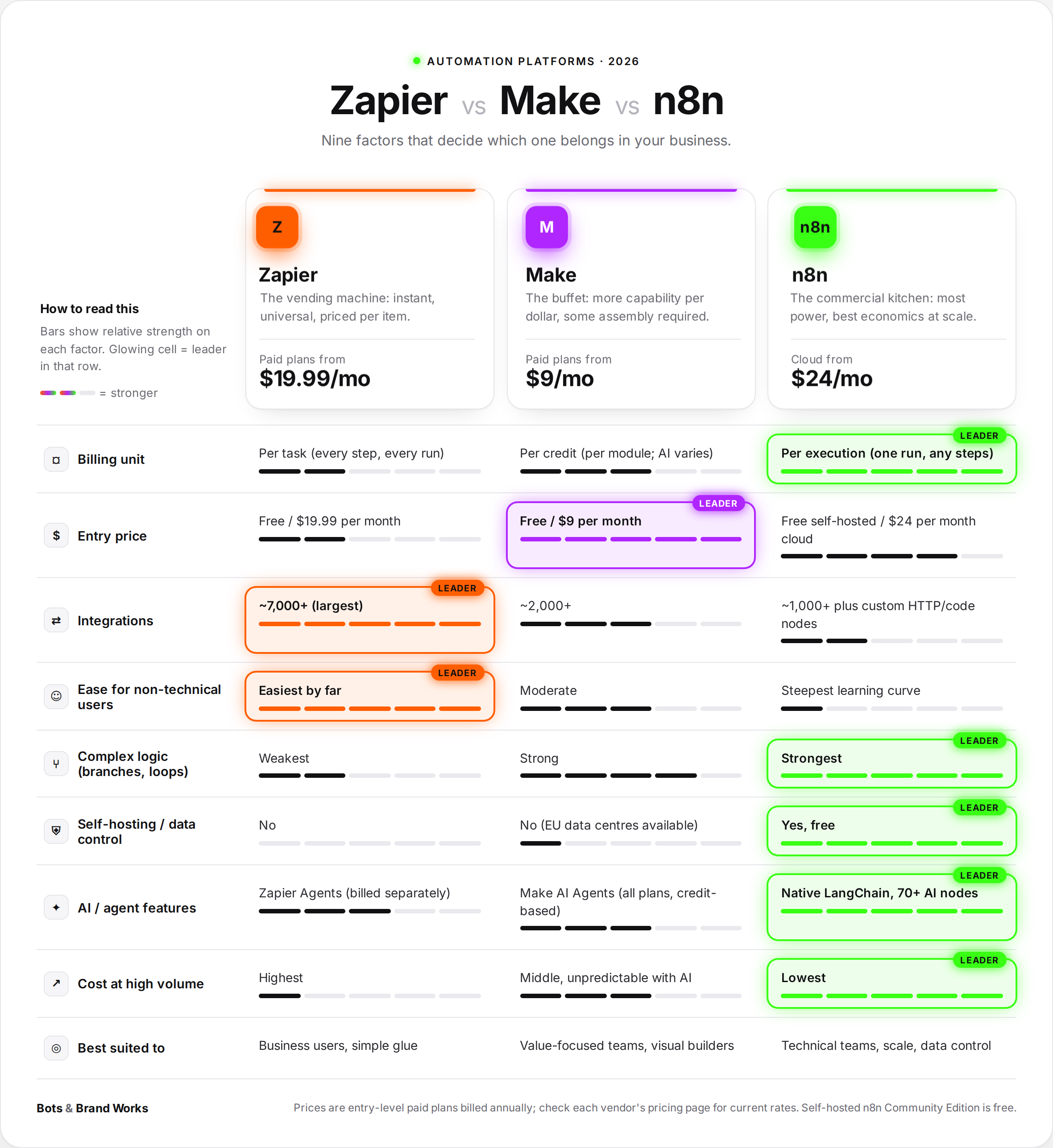
How Does It Compare to Zapier, Make and n8n?
Here is how the five approaches stack up against the traditional drag-and-drop platforms. (If you are choosing between the platforms themselves, see our full n8n vs Zapier vs Makecomparison.)
When the platforms still win
It is worth being clear: drag-and-drop platforms are not going away, and in many cases they are still the right answer.
- Simple, high-volume, fixed hand-offs. If a form submission always goes to the same CRM field and the same Slack channel, a Zap is cheaper, faster and easier to maintain than any agent.
- Teams with no technical help. Zapier remains the easiest way for a non-technical team to connect two apps today.
- Prototyping. n8n and others now include AI agent features, a quick way to test an idea before a custom build.
This is why most of the companies doing this well run what we call a hybrid stack: workflows as the rails, agents as the judgment layer. We explain the reference design in [The Hybrid Automation Stack].
Real-World Examples
The public examples tell us where the momentum is. Honeycomb's report that nearly 20% of its monthly interactive queries now come from agents shows agents are already ordinary users of business software. Microsoft's own illustrations for Copilot Studio include a sales operations agent that monitors pipeline changes and flags at-risk deals, and an expense process routed across finance and HR systems with automatic approvals.
To make it concrete for a smaller business, here are four illustrative scenarios. They are composites of common situations, not named clients, but each reflects a pattern we see regularly.
The professional services firm: skills instead of Zaps
A twelve-person accounting practice used eight Zaps to move client documents around. They worked, until a client sent a bank statement as a photo, or named a file "final FINAL v3." They kept the two simplest Zaps and moved everything involving reading documents to an AI workspace skill: "When a client emails documents, identify what each one is, file it in the right client folder with a standard name, update the checklist, and tell me what is still missing." No developer involved. The partner who knew the process wrote the skill in an afternoon and refined it over two weeks.
The e-commerce brand: an agent SDK for customer service
An online retailer handling a few thousand support emails a month built a support agent with an agent SDK. It reads each ticket, checks the order through the store's MCP connector, applies the returns policy, and drafts a reply. Anything involving a refund over a set amount, or an unhappy repeat customer, goes to a person with a one-paragraph summary.
The team now starts each morning with drafted, researched replies instead of a raw inbox.
The logistics company: durable execution for long-running jobs
A logistics firm's bookings could take days, from quote to customs documents to delivery. Their workflow platform kept losing track of half-finished bookings. They rebuilt it on a durable execution engine, with an agent reading customer emails and documents and fixed code doing the rest. Every booking now has a full history, nothing is double-booked after a crash, and they no longer pay for every waiting step.
The healthcare clinic: computer use for a legacy system
A clinic's fifteen-year-old patient system had no way to connect. A computer-use agent now copies web appointment requests into it, with every entry logged and a daily human spot-check. A stopgap, knowingly, that buys time to plan a proper replacement.
How Do Leading Companies Implement It?
They start with a process, not a tool. The question is never "how do we use agents?" It is "which process costs us the most time, errors or customer frustration, and does it need judgment?" Only processes that need judgment get an agent.
They keep the rails and add the brain. Simple workflows stay on platforms or move to plain code. Agents are added only at the steps where reading or deciding happens. This is the hybrid model from our pillar guide.
They build on open standards. MCP for connections, Agent Skills for processes. It keeps their options open as the tools change.
They design human approval in from day one. Every agent has clear limits: what it can do alone, what needs a person, and what it must never do. Approval gates sit before anything irreversible (sending money, deleting data, emailing a client for the first time).
They measure outcomes, not activity. Not "the agent ran 4,000 times" but "average response time fell from 9 hours to 40 minutes" or "invoice errors dropped by half." If they cannot measure it, they do not scale it.
They grow in waves. One process, proven, then the next.
How Do I Implement It? A Six-Step Plan
Here is the approach we use with clients. It works whether you have a developer or not.
Step 1: List your top ten repetitive processes
Note how long each takes per week, how often it goes wrong, and whether it needs reading or judgment. Our [AI Automation Audit] guide has a template for this.
Step 2: Sort them into rails, brain or leave alone
- Rails: same steps every time, structured data. Keep or build these on a workflow platform or simple code.
- Brain: varied inputs, decisions, reading documents. These are agent candidates.
- Leave alone: rare, high-stakes, or relationship-heavy work. Some things should stay human. See [When Not to Automate].
Step 3: Pick the right approach for each "brain" process
[Diagram 3: Which Approach Fits? A Decision Tree]
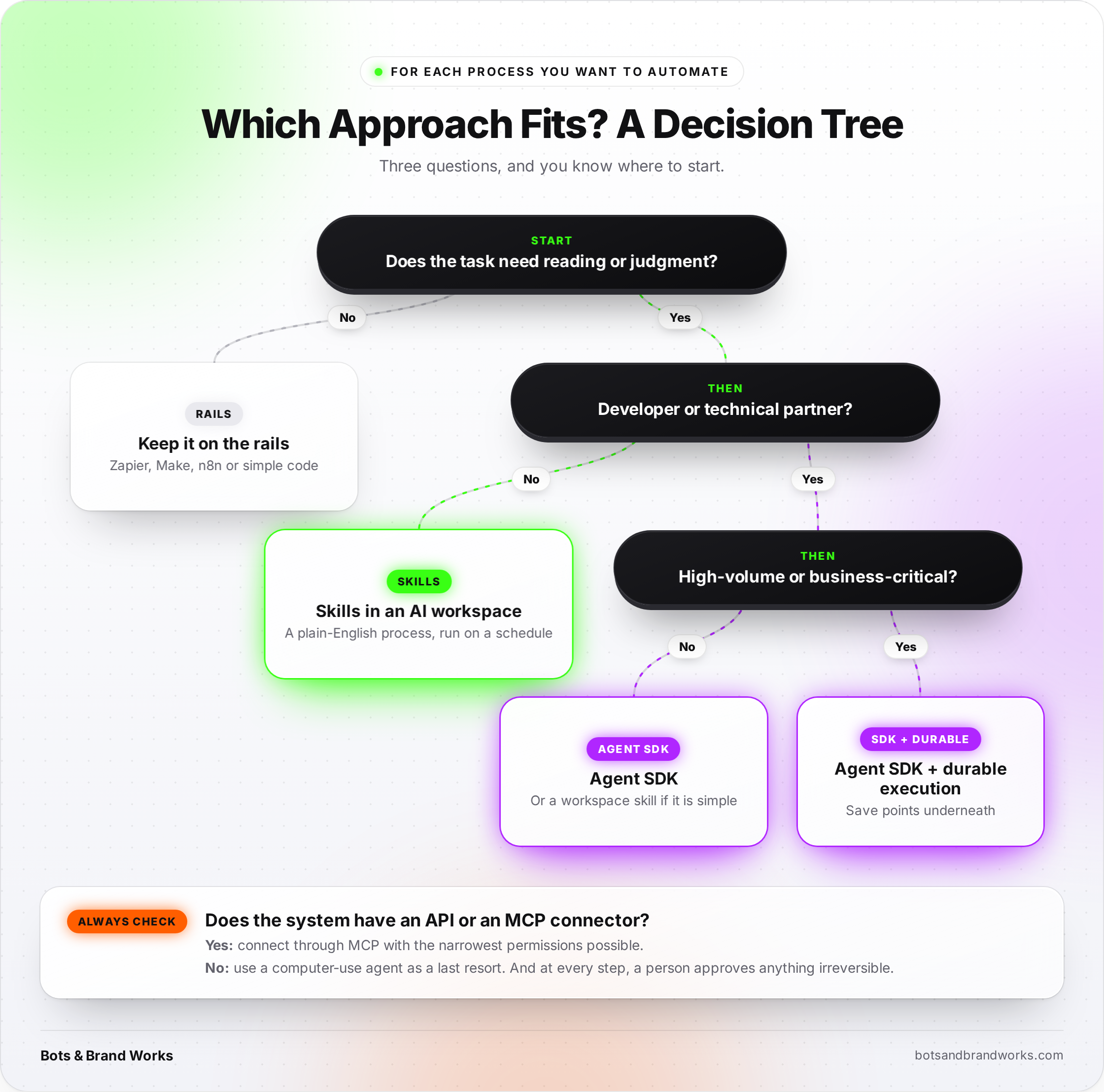
In short: non-technical teams start with workspace skills; technical teams use an agent SDK; critical or long-running work gets durable execution underneath; computer use only when there is no other way in.
Step 4: Connect through MCP, with least-privilege access
Check which of your business tools already offer an official MCP connector. Connect only what the agent needs, with the narrowest permissions possible. Read-only first; write access only when it is proven.
Step 5: Pilot one process for four to six weeks
Run the agent alongside the existing process. A human approves every action in week one, then only exceptions once accuracy is proven. Track three numbers: time saved, error rate, and cost per completed task.
Step 6: Scale what works, retire what does not
If the pilot hits its targets, widen it and move on to the next process. If it does not, stop, learn and try a different process. Stopping a pilot that is not working is a success, not a failure: it is exactly the discipline that keeps you out of Gartner's 40%.
Frequently Asked Questions
-
Yes. Companies now use agent SDKs, MCP connectors, plain-language skills in AI workspaces, durable execution engines and computer-use agents to automate work without a drag-and-drop platform. Most still keep simple, fixed workflows on a platform and use these newer approaches for work that needs reading or judgment.
-
Not always. Skills in AI workspaces such as Claude Cowork, ChatGPT workspace agents or Microsoft Copilot Studio can be written in plain English by business teams. Agent SDKs and durable execution engines do need a developer or technical partner
-
MCP, the Model Context Protocol, is an open standard that lets any AI agent connect to business tools through a common plug. Software vendors build the connector once and any compatible AI can use it, which reduces the need for a middleman integration platform.
-
It depends on volume and complexity. For simple, low-volume hand-offs, Zapier is usually cheaper and easier. For high-volume or multi-step processes, especially ones involving AI, code-based orchestration often costs far less because you pay mainly for the AI model and hosting rather than for every step.
-
They can be, with the right design: durable execution for crash recovery, clear success checks on every tool, human approval before irreversible actions, and full logs. Without those safeguards, agents can fail quietly, which is why many early projects are cancelled.
-
Usually not all of them. Keep Zaps that are simple, reliable and cheap. Move or rebuild only the workflows that keep breaking, need judgment, or have become expensive at volume. Most leading companies run a hybrid stack.
-
RPA follows pre-mapped clicks and stops when a screen changes. Computer-use agents are given a goal and adapt to changes on screen. Both are a fallback for systems without a proper connection point.
Not sure which of your processes belong on the rails and which need a brain? Bots & Brand Works builds on Zapier, Make and n8n as well as agent SDKs, MCP and custom stacks, so our advice follows your workflows, not a preferred tool. Send us your three most time-consuming processes and we will tell you which approach fits each one, and what it would take to build it.
Need Help Implementing AI?
Resources and Further Reading
Agentic AI vs Workflow Automation: The 2026 Enterprise Guide
Related: What Is MCP? A Plain-English Guide
Related: [The Hybrid Automation Stack](
Also referenced: n8n vs Zapier vs Make · [LangGraph vs OpenAI Agents SDK vs CrewAI ]· Human Approval in AI Agents · [Why AI Agent Projects Fail] · [AI Automation Audit] · [When Not to Automate]
Zapier and n8n alternatives once workflows become agents (Beri)
What Are the Benefits?
When this approach fits the work, the gains are real. Here are the six we see most often.
1. It handles the messy middle. Agents can read an unfamiliar email, a scanned invoice or a vague customer request and still do something sensible. That is the 20% of cases where traditional workflows give up and dump the job back on a person, and it is often where most of the time goes.
2. Costs follow the thinking, not the plumbing. With code-based orchestration, you pay mainly for the AI model's work plus modest hosting, instead of a platform fee for every step. For high-volume or multi-step processes, that can change the economics completely.
3. Fewer brittle connections. Because vendors maintain their own MCP servers, you are no longer relying on a third party to keep thousands of integrations up to date. When the CRM changes, the CRM's own connector changes with it.
4. Non-technical teams can build more. Skills turn process knowledge into automation without a flowchart. The operations manager who knows exactly how month-end reporting works can now write that knowledge down once and have it run every month.
5. Better control over data. Code-based agents and durable engines can run in your own cloud or servers, which matters for healthcare, finance and legal work.
6. Reliability you can audit. Durable engines keep a full history of what happened and why. When a client asks "what happened to my order?", you can answer.
What Are the Limitations?
This is the section most articles skip. Please do not skip it, because the risks are real and some are new.
1. Many agent projects fail. In the same June 2025 forecast mentioned above, Gartner predicted that over 40% of agentic AI projects will be cancelled by the end of 2027, citing escalating costs, unclear business value and inadequate risk controls. The lesson is not "avoid agents." It is "start with a clear, measurable problem." We go deeper on this in [Why AI Agent Projects Fail].
2. Silent failures. A drag-and-drop workflow that breaks usually breaks loudly: a red error, an email alert. An agent can fail quietly. Beri describes how an agent treats a tool error as part of its reasoning rather than as a failure, so a run can show green while nothing useful happened. The fix is to design tools that report clearly whether they succeeded, and to check outcomes, not just whether the run finished.
3. Less predictable model costs. The plumbing gets cheaper, but the AI model's bill can vary with how much it reads and how many steps it takes. You need budgets, limits and monitoring from day one.
4. Some approaches need technical skills. Agent SDKs and durable engines need a developer or a technical partner. Skills and AI workspaces do not, but they also have limits on volume and on how deeply they can integrate.
5. Security has a bigger surface. An agent with access to your inbox, CRM and payment system is powerful in both directions. Least-privilege access (give each agent only what it needs), human approval for anything irreversible, and clear logs are not optional extras.
6. The landscape moves fast. Building on open standards (MCP, Agent Skills) and keeping process knowledge in plain documents protects you from betting everything on one vendor.
How Does It Compare to Zapier, Make and n8n?
Here is how the five approaches stack up against the traditional drag-and-drop platforms. (If you are choosing between the platforms themselves, see our full n8n vs Zapier vs Makecomparison.)
Zapier / Make / n8n Agent SDKs MCP connectors Skills + AI workspaces Durable execution Computer-use agents What it is Visual workflow builders Code toolkits for AI agents Standard plugs from AI to apps Plain-English processes run by an AI assistant Crash-proof engine for long jobs AI that operates a screen Who builds it Business users (Zapier) to technical teams (n8n) Developers Software vendors (you connect them) Business teams Developers Developers or specialist partners Handles messy, varied cases Weak Strong Not applicable (it is the plug) Strong Not applicable (it is the safety net) Moderate Predictability High Moderate, needs testing High Moderate Very high Lower Cost driver Per task, credit or run AI model usage plus hosting Usually free with the app Workspace subscription plus usage Hosting or usage, low per step AI model usage, highest per task Best for Simple, repeatable hand-offs Judgment-heavy processes Connecting agents to many tools Recurring knowledge work High-volume, critical, long-running flows Legacy systems with no API
When the platforms still win
It is worth being clear: drag-and-drop platforms are not going away, and in many cases they are still the right answer.
- Simple, high-volume, fixed hand-offs. If a form submission always goes to the same CRM field and the same Slack channel, a Zap is cheaper, faster and easier to maintain than any agent.
- Teams with no technical help. Zapier remains the easiest way for a non-technical team to connect two apps today.
- Prototyping. n8n and others now include AI agent features, a quick way to test an idea before a custom build.
This is why most of the companies doing this well run what we call a hybrid stack: workflows as the rails, agents as the judgment layer. We explain the reference design in [The Hybrid Automation Stack].
Real-World Examples
The public examples tell us where the momentum is. Honeycomb's report that nearly 20% of its monthly interactive queries now come from agents shows agents are already ordinary users of business software. Microsoft's own illustrations for Copilot Studio include a sales operations agent that monitors pipeline changes and flags at-risk deals, and an expense process routed across finance and HR systems with automatic approvals.
To make it concrete for a smaller business, here are four illustrative scenarios. They are composites of common situations, not named clients, but each reflects a pattern we see regularly.
The professional services firm: skills instead of Zaps
A twelve-person accounting practice used eight Zaps to move client documents around. They worked, until a client sent a bank statement as a photo, or named a file "final FINAL v3." They kept the two simplest Zaps and moved everything involving reading documents to an AI workspace skill: "When a client emails documents, identify what each one is, file it in the right client folder with a standard name, update the checklist, and tell me what is still missing." No developer involved. The partner who knew the process wrote the skill in an afternoon and refined it over two weeks.
The e-commerce brand: an agent SDK for customer service
An online retailer handling a few thousand support emails a month built a support agent with an agent SDK. It reads each ticket, checks the order through the store's MCP connector, applies the returns policy, and drafts a reply. Anything involving a refund over a set amount, or an unhappy repeat customer, goes to a person with a one-paragraph summary.
The team now starts each morning with drafted, researched replies instead of a raw inbox.
The logistics company: durable execution for long-running jobs
A logistics firm's bookings could take days, from quote to customs documents to delivery. Their workflow platform kept losing track of half-finished bookings. They rebuilt it on a durable execution engine, with an agent reading customer emails and documents and fixed code doing the rest. Every booking now has a full history, nothing is double-booked after a crash, and they no longer pay for every waiting step.
The healthcare clinic: computer use for a legacy system
A clinic's fifteen-year-old patient system had no way to connect. A computer-use agent now copies web appointment requests into it, with every entry logged and a daily human spot-check. A stopgap, knowingly, that buys time to plan a proper replacement.