

n8n vs Zapier vs Make: Which Automation Platform Fits Your Business in 2026?
n8n, Zapier and Make compared honestly: pricing models, AI features, strengths, breaking points and which platform fits your business size and workflows in 2026.
Choosing an automation platform in 2026 feels a bit like choosing a gym in January. All three big names promise the same transformation, all three have passionate fans, and the pricing pages are engineered so that comparing them directly gives you a headache.
So let's do the comparison the pricing pages won't. n8n, Zapier and Make all connect your business tools and move data between them without a human clicking anything. They differ in how they charge, how much complexity they can handle, how technical you need to be, and how far their new AI features actually go. Those four differences decide which one belongs in your business, and by the end of this article you will know which it is.
One framing note before we start: this is a comparison of the rails, the workflow layer of your automation. Whether you also need the judgment layer (AI agents) on top is a separate decision, and it is exactly what our pillar guide, Agentic AI vs Workflow Automation, covers.
What Are These Three Platforms, in One Paragraph Each?
Zapier is the original and the biggest, launched in 2011, with around 7,000+ app integrations. Its superpower is accessibility: a marketer can connect two tools in ten minutes with zero IT involvement. Think of it as the vending machine of automation: instant, effortless, and you pay per item.
Make (formerly Integromat) is the visual middle child. Its canvas handles branching, loops and complex data mapping better than Zapier, at famously aggressive prices. It is the self-service buffet: more choice, more capability, lower prices, slightly more effort required to fill your plate.
n8n is the technical one. It is source-available, can be self-hosted on your own servers, and charges per workflow run rather than per step. It has also leaned hardest into AI, with native LangChain integration and 70+ AI nodes. This is the commercial kitchen: the most capable option by far, and the one where knowing your way around actually matters.
The Pricing Models: Where the Real Difference Hides
Feature lists look similar across all three. The billing units do not, and the billing unit is what decides your invoice at scale.
Zapier charges per task. Every step in a workflow, every time it runs, is one task. Pricing starts free (100 tasks/month), Professional from $19.99/month (750 tasks), Team from around $103.50/month for 2,000 tasks.
Make charges per credit. Plans run from free (1,000 credits/month) through Core at $9/month and Pro at $16/month to Teams at $29/month. A standard module action costs one credit, but here is the small print that matters: AI-native modules and code execution consume credits at higher, variable rates, so AI-heavy workflows are hard to forecast.
n8n charges per execution. One workflow run is one execution, no matter how many steps it contains. Cloud plans run from €24/month (2,500 executions) through €60/month Pro (10,000) to €800/month Business (40,000), and the self-hosted Community Edition is free with unlimited executions.
Why this matters more than any feature: take a 10-step workflow that runs 5,000 times a month. On Zapier that is 50,000 tasks; on n8n it is 5,000 executions. Same workflow, order-of-magnitude difference in billed units. At low volume all three cost pocket money. At high volume, the billing model IS the decision.
Head to Head: The Honest Comparison
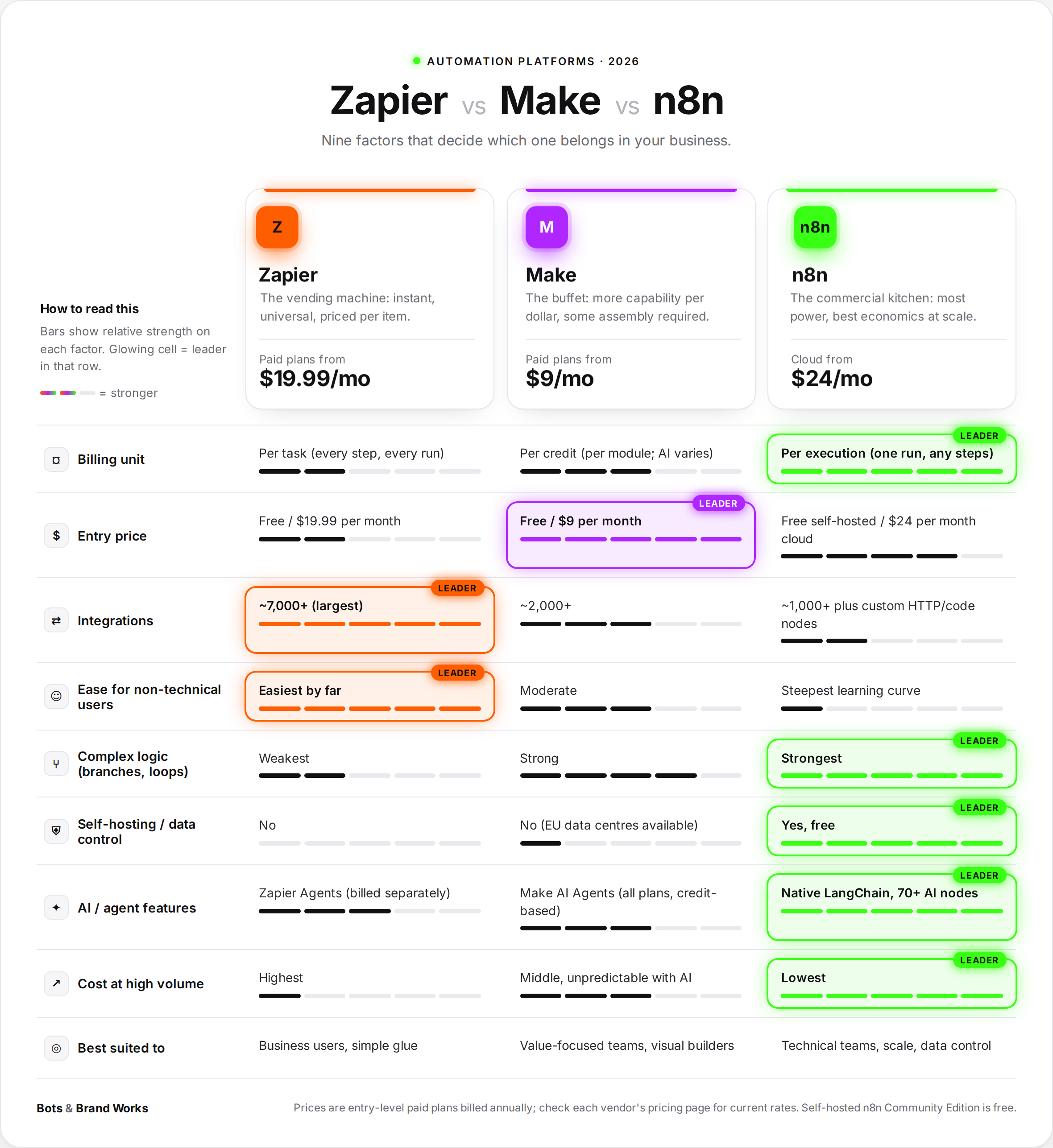
What Each One Is Genuinely Best At
Zapier wins on speed and breadth. If the tool exists, Zapier connects to it, and anyone in your business can build the connection today without training. For a small business automating a handful of simple hand-offs (form to CRM, invoice to spreadsheet, enquiry to Slack), Zapier remains the default for a reason. The moment it stops making sense has a community nickname, the "Zapier Wall": the point where volume makes per-task pricing hurt. We wrote a whole guide on spotting it: [When to Move from Zapier].
Make wins on value for visual complexity. If your workflows need branching ("if the order is over £500, do this, otherwise that"), loops, or heavier data reshaping, Make handles logic Zapier struggles with, at prices that undercut everyone. Its weak spots: the credit system gets unpredictable once AI modules enter the picture, and like Zapier it is cloud-only, so your data flows through their infrastructure.
n8n wins on power, price at scale, and control. Execution-based billing means complex workflows do not multiply your bill. Self-hosting means customer data can stay on your servers, which matters enormously for healthcare, finance, legal and privacy-conscious EU businesses. And its AI capabilities are the deepest of the three: genuine agent patterns (reasoning, tool use, memory, retrieval over your documents) can be built inside it. The price of all that power is that n8n assumes technical comfort. Handing n8n to a non-technical team is handing someone a commercial kitchen and wishing them luck.
The AI Question: Do the "Agents" Measure Up?
All three platforms now sell something called agents, and the word is doing a lot of heavy lifting. The test that cuts through the marketing, straight from our pillar guide: does it decide its own steps, or does it follow steps a human drew on a canvas?
Zapier Agents let you describe a behaviour in natural language and have AI carry it out across your apps. Note that they are billed separately from your main Zapier plan, with a free tier around 400 activities/month and paid tiers from roughly $20/month. Good for lightweight personal productivity (triage my inbox, research this lead). Not built for multi-agent systems or deep control.
Make AI Agentsrolled out across all plans in February 2026, with an Agent Builder that creates agents from a prompt. Genuinely convenient, but they run on Make's credit economics, which makes costs at scale hard to predict.
n8n's AI nodes are the most substantial: you can assemble real agent architectures visually, including retrieval over your own documents (RAG). For a technical team, n8n is arguably the fastest way to prototype a working agent without writing a full application.
The honest summary: platform agents are excellent for experimenting and for contained, personal-scale use cases. When an agent touches regulated data, core revenue processes or serious volume, custom builds take over, for reasons of control, cost tuning and governance that the pillar guide unpacks in full.
What Are the Limitations of All Three?
Worth saying plainly, because platform marketing will not.
They are all rented rails. Feature roadmaps, pricing changes and connector quality are the vendor's decisions, not yours. Zapier and Make are also cloud-only, which is a hard stop for some compliance regimes.
Spaghetti is a real risk on every platform. Forty workflows built over two years by three different people, none documented, is technical debt with a friendly interface, and it happens on Zapier, Make and n8n alike. Whoever builds, insist on naming conventions and documentation from workflow one.
None of them fix a judgment problem. If the work requires reading a messy email and deciding what to do, no amount of clever workflow design gets you there. Rules-based platforms automate decisions a human already made. The work that needs reasoning needs the agent layer.
Real-World Fits
The five-person consultancy: Zapier. Eight simple workflows, a few hundred runs a month, nobody technical. Zapier's Professional plan covers it for under $25 a month and anyone can maintain it. Moving to n8n would save them nothing and cost them a skill they do not have.
The e-commerce brand doing 30,000 orders a month: n8n. Their order-processing workflow has 14 steps. On per-task billing that is 420,000 tasks a month, which is a salary-sized invoice; on n8n it is 30,000 executions on a €60-800 plan, or free self-hosted. They keep two simple Zaps for the marketing team and run the heavy rails on n8n. Hybrid platform use is normal, not messy.
The bookkeeping firm with client data rules: self-hosted n8n. Client financial data cannot flow through third-party clouds under their engagement terms. Self-hosted n8n keeps every byte on their own server, with unlimited executions for the price of hosting. Neither Zapier nor Make can make that offer at all.
The marketing agency with complex campaign logic: Make. Branching campaign workflows, heavy data reshaping between ad platforms and reporting sheets, moderate volume, a tech-comfortable ops lead. Make's canvas handles the logic and the invoice stays small.
How Do I Choose? A Five-Question Filter
1. Who will build and maintain this? Non-technical team: Zapier. Tech-comfortable ops person: Make. Developer or technical partner available: n8n enters the running.
2. How many runs a month, honestly? Under 1,000: any platform, pick on ease. 1,000 to 10,000: Make or n8n start winning on price. Beyond 10,000, or workflows with many steps: n8n's execution billing is usually decisive.
3. Does your data have rules? If client or regulatory requirements restrict where data can flow, self-hosted n8n is the only real answer among the three.
4. How complex is the logic? Straight lines: Zapier. Branches and loops: Make or n8n. Logic that keeps outgrowing the canvas: that is a signal you are leaving platform territory altogether (see our pillar's five signals for moving beyond n8n).
5. What is the AI ambition? Experimenting with AI steps: all three do it. Prototyping genuine agents: n8n. Production agents on regulated or revenue-critical processes: prototype on a platform, then graduate to custom, the sequencing the pillar guide recommends.
And a permission slip most comparisons forget: you are allowed to use two. Zapier for the marketing team's quick connections, n8n for the heavy rails, is a common and sensible combination. Platforms are tools, not religions.
Frequently Asked Questions
-
At low volume, Make usually wins on sticker price. At high volume or with multi-step workflows, n8n wins, often dramatically, because it bills per workflow run rather than per step or per credit. Self-hosted n8n is free apart from hosting. The honest answer is always "cheapest for your volume and step count," which takes ten minutes with a calculator.
-
Harder than Zapier, meaningfully. Basic workflows are learnable, but n8n's power (code nodes, self-hosting, AI architectures) assumes technical comfort. If nobody on your team has it, budget for a freelancer or partner, or stay with Zapier or Make.
-
For lightweight agent tasks, their built-in agent features genuinely work. For agents touching regulated data, core revenue processes, or high volumes, custom builds win on control, cost tuning and governance. Test to apply: does it decide its own steps, or follow a canvas?
-
For simple, low-volume connections owned by business users, absolutely: nothing matches its ease and integration breadth. It stops being worth it when volume makes per-task pricing hurt or logic outgrows straight lines. That moment has a name, the Zapier Wall, and a migration path: [When to Move from Zapier].
-
Zapier and Make process your data on their cloud infrastructure (Make offers EU data centres for residency). For most businesses that is acceptable; for regulated industries it often is not, which is n8n self-hosting's core advantage. Whichever you choose, apply least-privilege: connect only the accounts and permissions each workflow needs.
-
Yes, but it is a rebuild, not an export: each platform's workflows are proprietary. This is why picking based on where you will be in 18 months, not just today, saves money. A well-documented workflow inventory makes any future migration dramatically cheaper.
The Takeaway
Zapier is the vending machine: instant, universal, priced per item. Make is the buffet: more capability per pound, some assembly required. n8n is the commercial kitchen: the most power, the best economics at scale, and the only one you can run entirely on your own premises, if you have someone who can cook.
Pick with the five questions: who maintains it, how many runs, what data rules, how complex the logic, and how far the AI ambition goes. And remember the platforms are the rails layer. The judgment layer, and whether you need one at all, is the bigger architectural question, and it is settled in our pillar guide: Agentic AI vs Workflow Automation.
Bots and Brand Works builds on all three platforms and on custom stacks, which means our recommendation follows your workflows, not our reseller margins. Send us your three most-used workflows and monthly volumes and we will tell you which platform they belong on, with the maths shown.
Need Help Implementing AI?
Resources and Further Reading
Agentic AI vs Workflow Automation: The 2026 Enterprise Guide
Related: [When to Move from Zapier](
Related: How Much Does AI Automation Cost?
n8n pricing: Click Here · Zapier pricing: Click Here · Make pricing: Click Here
n8n vs Zapier deep dive (HatchWorks): Click Here
Make credits explained (Carly): Click Here