

Where does AI actually help in a business? A function-by-function guide covering marketing, sales, HR, finance, customer service, operations and manufacturing, with real use cases, quick wins and honest watch-outs for each.
Ask ten business owners "should we be using AI?" and nine will say yes. Ask the follow-up, "using it where, exactly?", and the room goes quiet.
That silence is the real AI adoption gap. Not scepticism, not budget, but the simple fact that "AI" is sold as one giant thing when in reality it lands differently in every corner of a business. What AI does brilliantly in marketing (generate and personalise at scale) is almost the opposite of what it does brilliantly in finance (catch anomalies and never improvise). Treating them as the same purchase is how companies end up with an expensive pilot in the wrong department.
So this guide takes the tour, function by function: marketing, sales, HR, finance, customer service, operations and manufacturing. For each one you will get the same four things: what AI actually does there, the use cases earning their keep in real businesses, the fastest quick win, and the honest watch-out that vendors skip. By the end you will know not whether to use AI, but where first, which is the question that actually moves the needle.
One mental model before we start, because it applies everywhere. In every function below, AI plays one of three roles:
The assistant: helps a human do their existing job faster (drafting, summarising, researching). The analyst: finds patterns in data a human would miss (forecasting, anomaly spotting, scoring). The agent: completes whole tasks within boundaries (answering, routing, processing, chasing).
Assistants are cheap and safe. Analysts need decent data. Agents need governance. Keep those three roles in mind and every vendor pitch you hear this year will instantly become easier to categorise. (For the full architecture behind these roles, see our guide to [The AI Automation Stack], and for the rules-versus-reasoning decision underneath it all, our pillar guide: Agentic AI vs Workflow Automation.)
AI for Marketing: The Content Engine and the Targeting Brain
Marketing was AI's first conquest, and for a simple reason: marketing runs on two things AI happens to be spectacular at, producing words and images at volume, and finding patterns in audience data.
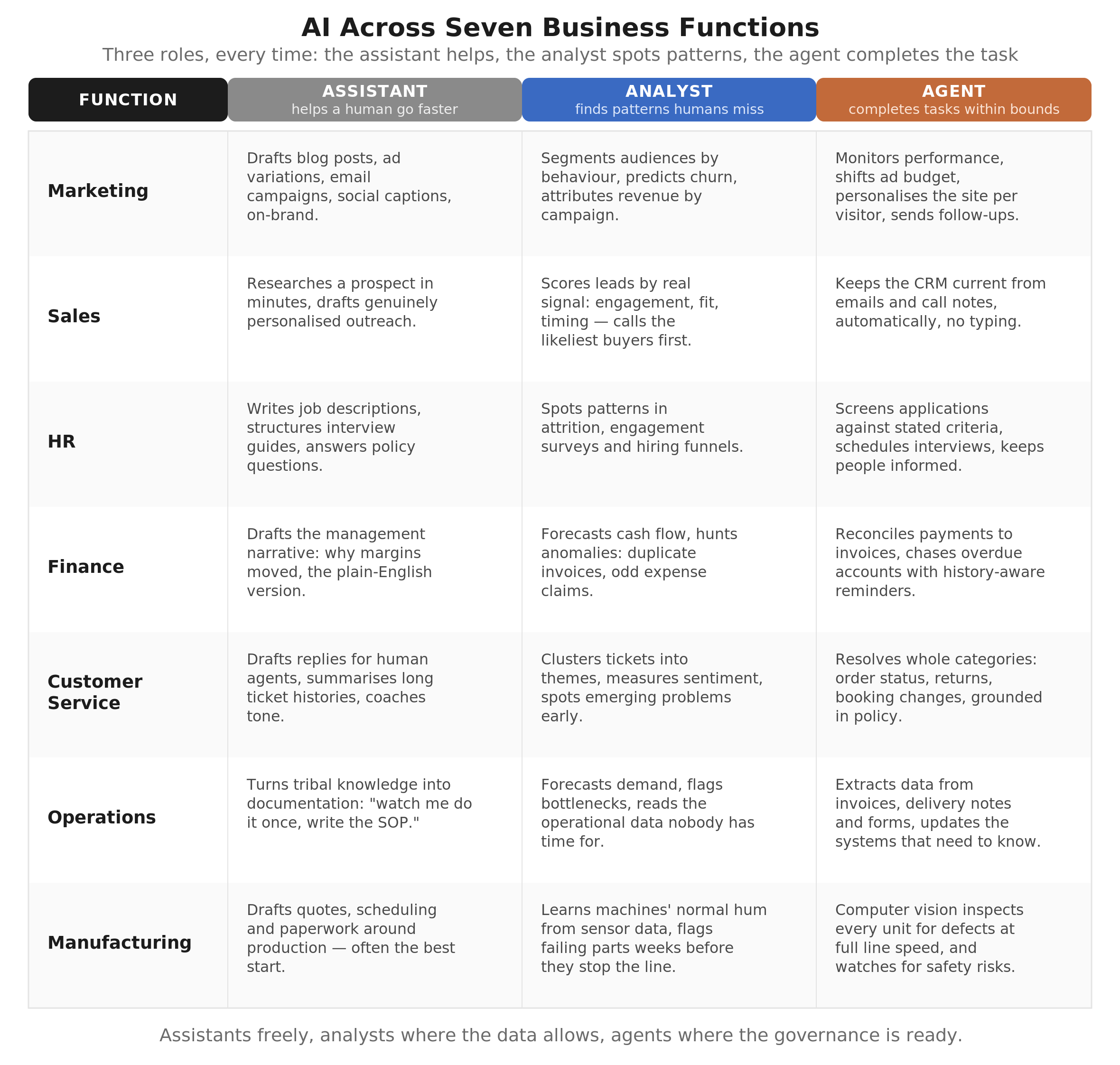
What AI actually does here. As an assistant, it drafts: blog posts, ad variations, email campaigns, social captions, product descriptions, all in your brand voice once properly briefed. As an analyst, it segments audiences by behaviour rather than guesswork, predicts which customers are drifting away, and tells you which campaigns actually drove revenue. As an agent, it can run whole loops: monitor performance, shift budget between ad sets, personalise a website per visitor, send the follow-up sequence.
The use cases earning their keep:
Content production at scale is the obvious one, but the compounding win is repurposing: one webinar becomes a blog post, six social posts, an email sequence and a sales one-pager, in an afternoon instead of a fortnight. Personalisation is the quiet one: emails and landing pages that adapt to the reader's industry or behaviour routinely outperform batch-and-blast. And search has changed shape: with buyers now asking ChatGPT and Google's AI for recommendations, optimising content so AI systems cite you (sometimes called AEO) is becoming as important as classic SEO.
Quick win: take your best-performing piece of content from last year and have AI repurpose it into five formats this week. Zero risk, immediate output, and the exercise teaches your team more about prompting than any course.
The watch-out: volume is not strategy. AI makes producing content nearly free, which means the internet is drowning in adequate, generic, nobody-asked-for-this content. The businesses winning with AI marketing use it to produce more of what only they can say (their data, their stories, their point of view), not more of what anyone could say. If a competitor could publish your AI-generated post unchanged, it was not worth publishing.
AI for Sales: Research, Prioritisation and the End of Admin
Salespeople spend a startling share of their week not selling: researching prospects, updating the CRM, writing follow-ups, chasing silence. That admin layer is AI's natural habitat.
What AI actually does here. As an assistant, it researches a prospect in minutes (company news, tech stack, likely pain points) and drafts genuinely personalised outreach instead of "I hope this email finds you well." As an analyst, it scores leads by real signals (engagement, fit, timing) so your team calls the five most likely buyers first instead of working the list alphabetically. As an agent, it keeps the CRM current from emails and call notes automatically, which fixes the oldest lie in sales: the pipeline report.
The use cases earning their keep:
Lead scoring and prioritisation, because the difference between calling hot leads first and calling randomly is measured in revenue, not convenience. Call intelligence: AI that transcribes and summarises sales calls, extracts commitments and next steps, and spots patterns across dozens of calls ("we lose deals when pricing comes up before the demo") that no manager has time to hear manually. And proposal drafting: first drafts assembled from the call notes and your past proposals, so the rep edits instead of staring at a blank page.
Quick win: switch on AI call summaries (most meeting tools now include them) and pipe them into your CRM. One afternoon of setup, and your CRM stops depending on whether reps enjoy typing.
The watch-out: buyers can smell automated sincerity. AI-personalised outreach at scale is a crowded arms race, and badly done it damages the brand with every send. The rule that holds: use AI to know the prospect better, and a human to decide what is actually worth saying to them. Research at machine scale, relationships at human scale.
AI for HR: Faster Hiring, Better Answers, Careful Lines
HR is two jobs wearing one name: a high-volume process job (hiring pipelines, onboarding, policy questions) and a deeply human judgment job (development, disputes, culture). AI belongs enthusiastically in the first and cautiously at the edges of the second.
What AI actually does here. As an assistant, it writes job descriptions, structures interview guides, drafts onboarding plans and answers the endless stream of policy questions ("how many days of parental leave do I get?") from your actual handbook, instantly, at any hour. As an analyst, it spots patterns in attrition, engagement surveys and hiring funnels. As an agent, it screens applications against stated criteria, schedules interviews and keeps candidates informed, the process layer where delays actually lose good people.
The use cases earning their keep:
The internal HR assistant grounded in your policies is the fastest win in the whole function: it removes the same twenty questions from HR's inbox forever, and staff prefer asking a bot about sensitive-adjacent topics anyway. Interview logistics (scheduling, reminders, feedback collection) is pure process and automates cleanly. And onboarding: a new starter's first two weeks, orchestrated automatically, with the right documents, accounts and check-ins arriving on time, is the difference between a welcome and an ambush.
Quick win: ground an assistant in your staff handbook and let employees ask it questions. Weeks to deploy, immediately useful, and it surfaces every gap and contradiction in your handbook as a bonus (uncomfortable, but useful).
The watch-out: the sharpest one in this article. AI making or heavily influencing decisions about people (hiring, promotion, dismissal) is legally regulated territory in a growing list of jurisdictions, and rightly so, because models trained on historical data can inherit historical biases. The safe pattern: AI handles process and information, humans make every judgment about a person, and any screening automation is regularly audited for skewed outcomes. If a vendor promises "AI that picks your best candidates," ask them who is liable when it picks wrongly. Watch the pause.
AI for Finance: The Anomaly Hunter That Never Gets Bored
Finance might be AI's most underrated home. It lacks marketing's glamour, but the fit is beautiful: finance runs on structured data, repetitive rules and the need to spot the one odd transaction in ten thousand, which is precisely the work humans find soul-destroying and machines find easy.
What AI actually does here. As an assistant, it drafts the narrative: the management summary explaining why margins moved, the board pack commentary, the plain-English version of the numbers. As an analyst, it forecasts cash flow from patterns in your actual receivables and payment history, and hunts anomalies: duplicate invoices, odd expense claims, transactions that break the usual pattern. As an agent, it does the reconciliation grind: matching payments to invoices across bank, processor and accounting system, chasing the unpaid ones with reminders matched to each customer's history.
The use cases earning their keep:
Invoice processing and reconciliation, because matching and coding transactions is the definition of rules-plus-slight-judgment work. Cash flow forecasting that updates continuously instead of living in a quarterly spreadsheet. Accounts receivable chasing, where an agent that sends politely persistent, history-aware reminders routinely shortens payment cycles by days or weeks. And expense and fraud screening, where the analyst role shines: flagging the claim that is technically within policy but statistically peculiar.
Quick win: automate invoice chasing. It is bounded, low-risk (worst case: a polite reminder sent slightly early), measurable in days-sales-outstanding, and the ROI shows up in the bank balance, which is the most persuasive dashboard ever invented.
The watch-out: finance is exactly where you do not want creative AI. The pattern that works is AI drafts and flags, humans approve and file: every journal entry, every payment, every filing keeps a human signature and a clean audit trail. Regulators and auditors do not accept "the model decided." Happily this is also the cheapest guardrail to build, since finance already thinks in controls; see our [AI Agent Governance] guide for the mechanics.
AI for Customer Service: The Function AI Was Born For
If one function has been transformed end to end, it is this one. The volume is high, the questions repeat, the answers live in documents, and speed is the whole game: the natural shape of AI's strengths.
What AI actually does here. As an assistant, it drafts replies for human agents, summarises long ticket histories in seconds, and coaches tone. As an analyst, it clusters tickets into themes ("returns confusion doubled since the website change"), measures sentiment, and spots emerging problems before they trend. As an agent, it resolves whole categories of tickets: order status, returns, booking changes, product questions, grounded in your policies and connected to your systems.
The use cases earning their keep:
The grounded support assistant that answers from your documentation (the RAG pattern our [RAG guide] explains) deflects the repetitive majority around the clock. Intelligent triage, where every incoming message is classified, prioritised and routed with a summary attached, so humans start every ticket halfway done. And the full-resolution agent for bounded tasks: "where is my order?" answered with the actual order status, not a link to a tracking page.
Quick win: deploy the grounded FAQ assistant on your top twenty questions. It is the single most proven AI deployment in business, weeks to launch, and the deflection rate is measurable from day one.
The watch-out: the industry's most famous cautionary tale lives here. Klarna's AI assistant reportedly did the work of around 850 agents, then the company rehired humans after customers rejected generic answers on hard cases. The lesson is not "don't automate support"; Klarna kept the AI. It is that the machine handles volume and the humans handle judgment, with escalation designed rather than improvised. Customers forgive a bot that hands them to a human quickly. They do not forgive a bot that stands between them and a human.
AI for Operations: The Unglamorous Goldmine
Operations rarely stars in AI keynotes, which is ironic, because the highest-ROI automations we see live here: the invisible workflows that keep a business running, done by hand, by someone who has better things to do.
What AI actually does here. As an assistant, it turns the tribal knowledge into documentation ("watch me do it once, write the SOP"). As an analyst, it forecasts demand, flags bottlenecks, and reads the operational data nobody has time to read. As an agent, it processes the paper: extracting data from supplier invoices, delivery notes, order confirmations and forms, then updating the systems that need to know, the work our [Hybrid Automation Stack] guide calls the rails plus the skilled worker.
The use cases earning their keep:
Document processing is the sleeper hit of business AI: every business has a stream of semi-structured paper (PDFs, emails with attachments, scanned forms) that someone retypes into systems, and modern AI reads them with startling accuracy. Scheduling and dispatch, where constraints (staff, vehicles, deadlines) meet daily chaos. Inventory and demand forecasting for anyone holding stock. And vendor management: contracts summarised, renewal dates flagged, price changes caught (our [contract review] thinking applies here).
Quick win: pick the retyping. Find the one document stream someone manually keys into a system every day, and automate the extraction. It is bounded, boring and beautifully measurable, which makes it the perfect first project by every rule in our [Why AI Projects Fail] checklist.
The watch-out: operations automations fail quietly. A marketing mistake is embarrassing in public; an operations mistake (a misread invoice quantity, a wrong delivery date) propagates silently through systems until it becomes a physical problem: wrong stock, missed delivery, unhappy customer. Exception handling is not an edge case here, it is the design centre: confidence thresholds, human review queues for anything unclear, and monitoring that watches quality rather than just uptime.
AI for Manufacturing: Eyes, Ears and Foresight on the Line
Manufacturing AI deserves its own article (and in the industrial world, gets whole conferences), but the SMB-relevant story is clear and increasingly affordable: AI gives the production line senses and foresight.
What AI actually does here. As an analyst, its flagship act is predictive maintenance: learning the normal hum, heat and vibration of your machines from sensor data, then flagging the bearing that has started failing weeks before it stops the line. Unplanned downtime is the most expensive time in manufacturing, and predicting it is worth more than almost any other insight. As an agent with eyes, computer vision inspects every unit for defects, at full line speed, without blinking, catching flaws human inspectors miss by the afternoon of day two. And across the planning office, the same demand forecasting, scheduling and document automation from operations applies double: production planning, materials ordering, quality documentation.
The use cases earning their keep:
Visual quality inspection, now viable for smaller manufacturers because it increasingly needs a camera and a subscription rather than a research team. Predictive maintenance on the critical machines (start with the one whose failure hurts most). Production scheduling that re-plans when reality interferes, which is daily. And safety monitoring: vision systems that spot the missing hard hat or the blocked fire exit without a supervisor standing watch.
Quick win: most SMB manufacturers should actually start with the office, not the line: the quoting, scheduling and paperwork around production automates faster and cheaper than the machinery, and funds the sensor projects. On the line itself, one camera on your worst quality station is the classic entry point.
The watch-out: shop-floor AI meets physical-world constraints: sensors need installing, legacy machines speak no digital language (the integration challenge our pillar notes, only 29% of enterprise systems have modern APIs, is worst here), and anything touching safety systems carries certification requirements that software people underestimate. Budget for the physical plumbing, and never let an uncertified system make safety decisions.
Where Should Your Business Start? The Cross-Functional Answer
Seven functions, dozens of use cases. Here is how to choose without a committee retreat.
Rank by pain, not fashion. The right first project is where repetitive hours pile up in YOUR business, not where AI demos best. A distributor's answer is operations; an agency's is marketing admin; a subscription business's is customer service. Count the hours (two weeks of tallying, per our [ROI guide]) and the ranking writes itself.
Prefer the assistant-analyst-agent ladder. Within any function, start with assistant uses (cheap, safe, instant), graduate to analyst uses as your data allows, and deploy agents where volume and governance justify them. Skipping rungs is how projects join [the 40% that get cancelled].
One function, one workflow, properly. The portfolio approach ("a little AI everywhere") produces a little value everywhere and proof nowhere. One measured win creates the budget, the skills and the internal believers for the second. This is the sequencing lesson the pillar guide proves with hard numbers.
Reuse the plumbing. The stack you build for the first function (connections, memory, monitoring; see [The AI Automation Stack]) serves every function after. The first project is the expensive one. By the third, you are assembling, not building.
Frequently Asked Questions
-
Customer service shows the fastest, most proven returns (high volume, repetitive questions, answers in documents), with operations close behind on ROI and marketing on adoption. But the honest answer is function-agnostic: the biggest benefit lives wherever YOUR business burns the most repetitive hours. Count first, choose second.
-
You do not buy it across functions; you build one function at a time and reuse the plumbing. Entry points are modest: assistant-level tools from tens of pounds monthly, grounded assistants from the low thousands (full ranges in [How Much Does AI Automation Cost?]). The expensive mistake is starting everywhere at once.
-
The consistent pattern across real deployments: AI absorbs the repetitive layer of each role (the admin, the retyping, the first drafts) rather than whole jobs, and the businesses getting it right redeploy that time into judgment work: selling, serving, improving. Klarna's rehiring of human agents after over-cutting is the market's own correction on this point.
-
Tools assist a human doing the task (drafting, summarising); agents complete tasks within boundaries (resolving the ticket, chasing the invoice). Agents deliver more and demand more: governance, monitoring and escalation design. Most functions should adopt tools broadly and agents selectively. Our [AI Agents vs Chatbots] guide draws the full line.
-
HR decisions about people (hiring, promotion, dismissal) carry legal and ethical weight that demands humans in every judgment, with AI confined to process. Finance requires audit-proof human sign-off on money movements. In both, AI works brilliantly as assistant and analyst, and should act as agent only within tight, reviewed boundaries.
-
Assistant-level adoption: days. A grounded assistant (support, HR policies): weeks. Agent automations with system connections: one to two months to build, a quarter to prove. Function-wide transformation is a year of sequenced projects, not one purchase, and the benchmarks reward the patient: [payback of 3 to 6 months per focused automation](https://automationatlas.io/answers/how-to-calculate-automation-roi/).
The Takeaway
"Should we use AI?" was never the useful question. The useful question has a table for an answer: seven functions, three roles, one place where your particular business bleeds the most repetitive hours.
Marketing gets a content engine, sales gets its admin back, HR gets faster process around human judgment, finance gets a tireless anomaly hunter, customer service gets volume handled and humans reserved for the hard cases, operations gets the retyping abolished, and manufacturing gets senses and foresight. Same technology, seven different jobs, one rule throughout: assistants freely, analysts where the data allows, agents where the governance is ready.
Start where it hurts, prove it with numbers, reuse the plumbing, and the second function is half the price of the first.
Bots and Brand Works helps businesses run exactly this prioritisation: we map your functions, tally the repetitive hours, and tell you where AI pays first, with the maths shown. If you read one section of this article twice, that is probably your starting function. Tell us which one it was.
Need help implementing an AI Solution?
Resources and Further Reading
Agentic AI vs Workflow Automation: The 2026 Enterprise Guide
Related: [The AI Automation Stack Explained](
Related: How Much Does AI Automation Cost?
Klarna case analysis: Click Here
Enterprise integration statistics (Ideas2IT): Click Here
Automation ROI benchmarks (Automation Atlas): Click Here