

Agent Memory Explained: How AI Remembers Your Business (and Why It Forgets)
AI agents are amnesiacs by default. Agent memory fixes that in layers: working memory, long-term memory and retrieved knowledge. How each works, what goes wrong, and the design questions buyers should ask.
Here is the strangest fact about the technology behind every AI agent: the brain has no memory.
A large language model, for all its brilliance, wakes up fresh with every request. It does not remember your last conversation, your customer's name, or the thing it did thirty seconds ago, unless something outside the model deliberately reminds it. Every appearance of memory in every AI product you have used is engineering: systems built around the brain to catch, store and re-supply what matters.
For a business deploying agents, this is not trivia; it is the difference between an agent that feels like a competent colleague and one that feels like a goldfish with a good vocabulary. Memory design decides whether your agent knows the customer already emailed twice this week, whether it repeats yesterday's mistake, and whether it quotes this month's prices or last year's. So let's open this particular organ up properly: the three layers of agent memory, how each works, where each fails, and what to ask anyone building yours.
(This is one chapter of our agent anatomy series; the full skeleton is in [What Is an AI Agent?], and the concept overview in [What Is Agentic AI?].)
The Amnesiac Genius: Why Memory Must Be Built
One mental model makes everything else in this article click.
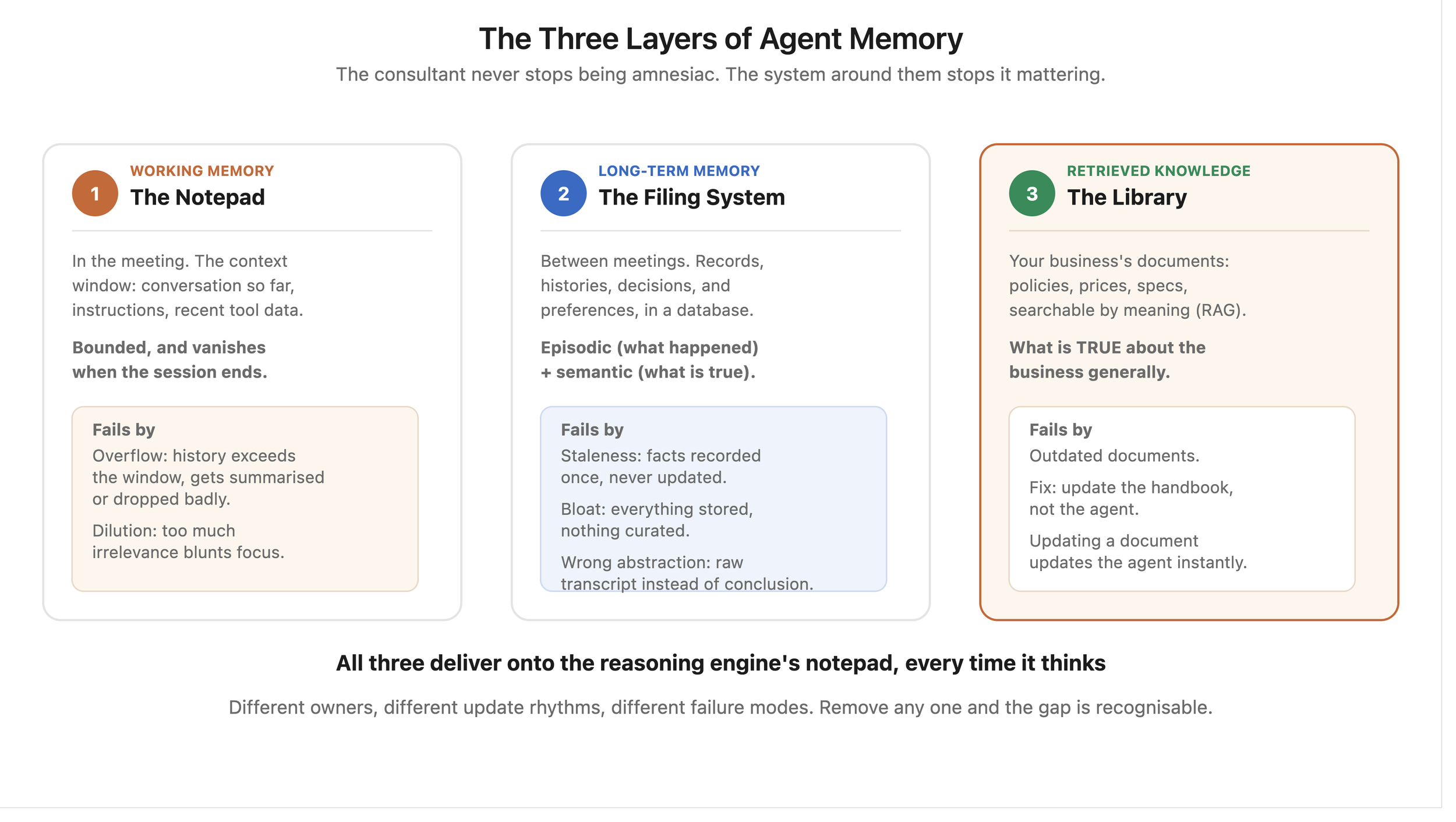
The analogy: imagine hiring the world's most capable consultant, with one condition: total amnesia between meetings, and even within a long meeting, notes slide off the table when it gets too full. Brilliant, but structurally forgetful. How would you make this consultant useful? Exactly the way the industry does: a notepad in the meeting (working memory), a filing system between meetings (long-term memory), and a research library they can consult on demand (retrieved knowledge). The consultant never stops being amnesiac; the system around them stops it mattering.
Every agent memory architecture is those three layers, so let's take them one at a time.
Layer 1: Working Memory. The Notepad in the Meeting
What it is: the context window: everything the model can "see" right now: the conversation so far, the task instructions, the data from recent tool calls. This is the only memory the brain natively has, and it is bounded: big (modern models hold hundreds of pages), but finite, and everything in it vanishes when the session ends.
How it fails, in two familiar ways. First, overflow: long tasks generate more history than the window holds, so something must be dropped or summarised, and badly chosen summaries lose the detail that mattered (the classic "it forgot what we agreed an hour ago"). Second, dilution: even within limits, models attend less sharply to a window stuffed with irrelevance; a focused notepad beats a hoarder's one.
The design work you are paying for: deciding what stays verbatim, what gets summarised, and what gets pushed out to longer-term storage, continuously, mid-task. Good builds manage the notepad like a chief of staff manages a leader's briefing: ruthless relevance.
Layer 2: Long-Term Memory. The Filing System Between Meetings
What it is: everything the agent should know across sessions, stored outside the model and re-supplied when relevant: customer records and histories, past interactions, decisions made, preferences learned, tasks completed. In practice this lives in ordinary, battle-tested databases (PostgreSQL being the workhorse, as our [AI automation stack] guide covers): exact facts, exact records, queryable forever.
The two flavours worth knowing. Episodic memory: what happened ("this customer returned two jackets in March, we refunded £240 on approval"). And semantic memory: what is true ("this customer prefers email, is on the trade discount, flagged as VIP"). Good agents use both: the episode explains, the fact directs.
How it fails. Staleness: facts recorded once and never updated ("prefers phone" from 2024). Bloat: everything stored, nothing curated, so retrieval drowns in noise. And the subtle one, wrong abstraction: storing raw transcripts when the agent needed conclusions, or conclusions when it needed the verbatim quote. Memory curation (what to write down, in what form, when to update, when to forget) is unglamorous design work and it is most of the difference between agents that learn and agents that hoard.
Layer 3: Retrieved Knowledge. The Research Library
What it is: your business's documents (policies, prices, product specs, procedures) made searchable by meaning, so the agent can pull the right page at the right moment. This is RAG with its vector database, and it earned its own full article: [Vector Databases and RAG Explained]. The one-line refresher: the library does not live in the agent's head; it gets consulted, page by relevant page, which is why updating a document updates the agent instantly.
Why it is a separate layer. The filing system holds what happened with YOUR specific customers and tasks; the library holds what is TRUE about your business generally. Different update rhythms, different owners, different failure modes: the library fails through outdated documents (fix the handbook, not the agent), the filing system through poor curation.
How the Layers Work Together: One Email, Three Memories
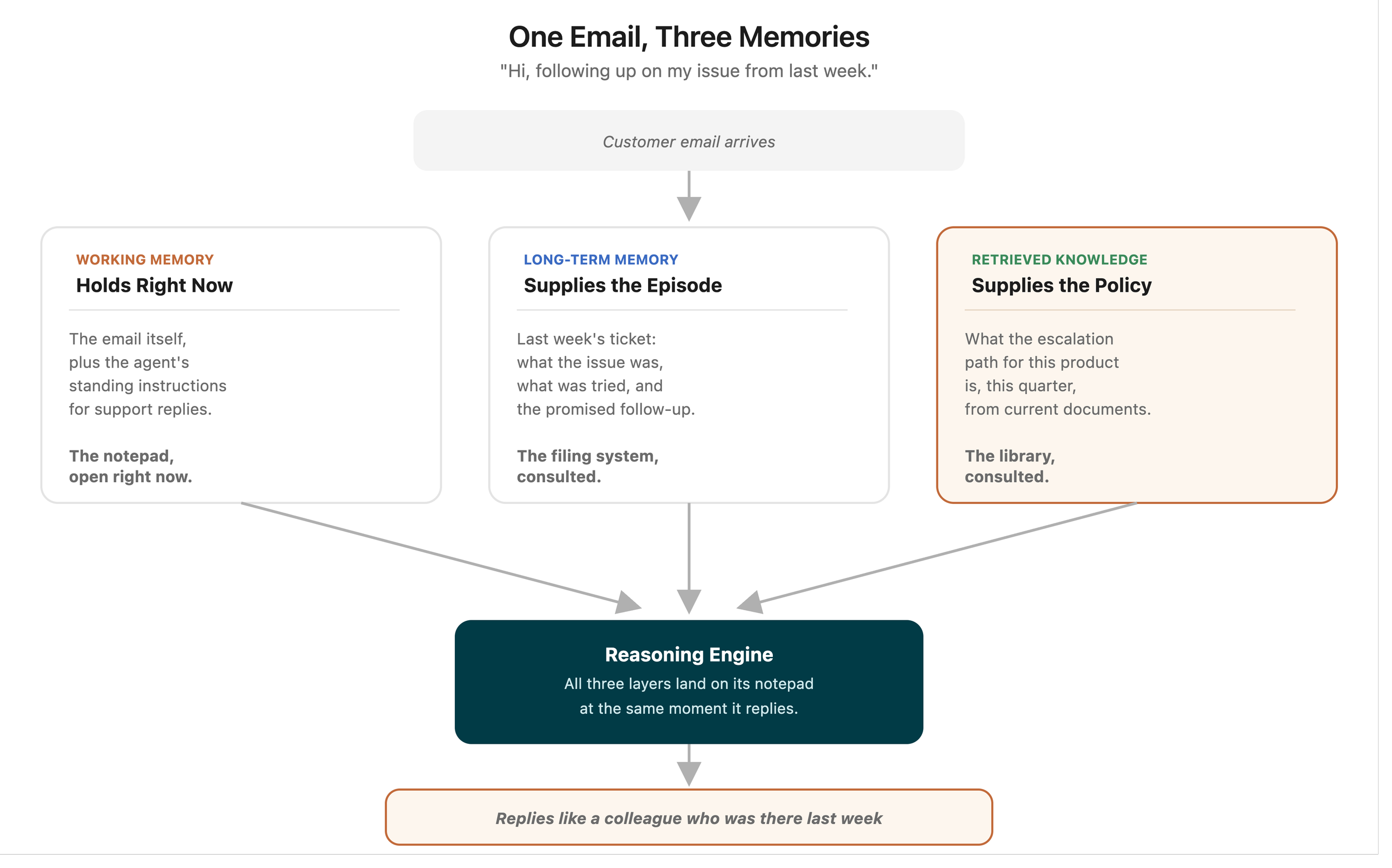
A customer emails your support agent: "Hi, following up on my issue from last week."
Working memory holds the email and the agent's instructions. Long-term memory supplies the episode: last week's ticket, what was tried, the promised follow-up. The library supplies the policy: what the escalation path for this product is this quarter. The reasoning engine gets all three delivered onto its notepad, and replies like a colleague who was there last week, because the system around the amnesiac made it so.
Remove any layer and the failure is recognisable: without long-term memory, "please describe your issue" (rage); without the library, invented policy (risk); without working-memory discipline, losing the thread mid-conversation (distrust). When users say an agent "feels smart," they are usually complimenting its memory design, not its model.
Why Should a Business Buyer Care?
Because memory is the moat, not the model. Every competitor rents the same brains. What they cannot rent is your filing system and your library: the accumulated episodes, curated facts and current documents that make YOUR agent know YOUR business. Memory is where an agent deployment compounds value over time, which also means memory neglect is where deployments quietly rot.
Because most "AI got it wrong" complaints are memory complaints. Wrong price: stale library. Repeated question: missing episodic memory. Forgot mid-task: notepad overflow. Diagnosing by layer turns mysteries into maintenance tickets, and the fix is usually a document or a curation rule, not a new model.
Because privacy lives here. Memory is where customer data persists, so this layer carries the data-protection weight: what is stored, for how long, who can query it, what gets forgotten on request. The [governance guide]'s least-privilege and audit principles apply to memory reads and writes exactly as to actions, and "what does the agent remember about people?" belongs in every deployment review.
What Are the Limitations?
Forgetting must be designed too. Real businesses need deletion: customers who leave, data-retention limits, the right to be forgotten. A memory system with no forgetting policy is a compliance incident maturing quietly.
Memory can entrench errors. A wrong conclusion written to long-term memory becomes tomorrow's confident context. Good builds mark memories with provenance and confidence, and the [reflection] loop re-checks what matters.
Shared memory is a coordination problem. Once [multiple agents] read and write the same filing system, you inherit the classic issues: conflicting updates, one agent's error becoming everyone's belief. Same solution as human teams: clear ownership of records and review at the writes.
More memory is not better memory. Retrieval quality beats storage quantity everywhere in this field. The goldfish with a perfect filing system outperforms the hoarder with a warehouse.
The Memory Audit: Five Checks for a Running System
For businesses that already have an agent live, here is the half-day audit that finds the leaks before customers do.
Check 1: The staleness sweep. Pick ten facts the agent relies on (prices, policies, key customer attributes) and trace each to its source: is the document current, is the stored fact dated, when was it last verified? Anything without a "last updated" trail is a wrong answer waiting for its moment.
Check 2: The retrieval spot-test. Ask the agent ten real questions and inspect not just the answers but what was retrieved to produce them: the right pages? The current versions? A correct answer built on lucky retrieval fails next week; the retrieval, not the answer, is what you are auditing.
Check 3: The continuity test. Run a two-session scenario: raise an issue today, follow up "on it" tomorrow. Does the agent connect them, and is what it remembered appropriate (the conclusion, not necessarily the verbatim rant)? This one test exercises all three layers at once.
Check 4: The forgetting drill. Request deletion of a test customer's data, then probe: does any trace survive in long-term memory, logs, or retrievable summaries? If the deletion path has never been tested, it does not exist; auditors agree.
Check 5: The write review. Sample twenty recent long-term memory writes: are they curated conclusions or raw transcript hoarding? Correct? Attributed and dated? This sample predicts your memory quality a year out better than anything else, because writes are the compounding input.
Half a day, quarterly, owned by whoever owns the agent. Most businesses that run it the first time find two staleness leaks and one hoarding habit, all fixable in an afternoon, all invisible until a customer would have found them instead.
The Buyer's Memory Questions
Five questions for any vendor or builder:
- What does the agent remember across sessions, and where does that live?
- What gets written to long-term memory, who decided that rule, and how is it kept current?
- Is business knowledge retrieved from OUR documents, with citations, and what is the update cadence when documents change?
- What is the forgetting policy: retention limits, deletion requests, stale-fact review?
- Show me a wrong answer traced to its memory source, and the fix.
Fluent answers mean the memory was designed. Pauses mean it accreted, and accreted memory is where next year's mysteries are being stored today.
Frequently Asked Questions
Do AI agents have memory built in? No. The underlying models are stateless: they forget everything between requests. All agent memory is engineered around the model in layers: a managed context window (working memory), databases for cross-session facts and history (long-term), and retrieval from your documents (knowledge). Quality varies exactly as much as that engineering does.
What is a context window in simple terms? The model's notepad: everything it can consider at once, from instructions to conversation history to fresh data. It is large but finite, and managing what deserves space on it, verbatim, summarised or archived, is a core part of agent design.
What is the difference between RAG and agent memory? RAG is one layer of it: retrieving relevant knowledge from your documents at question time. Full agent memory adds working-memory management and long-term episodic and factual storage about specific customers and tasks. RAG answers "what is true about the business"; long-term memory answers "what happened with this customer."
Why does my AI keep forgetting things mid-conversation? Notepad overflow: the conversation outgrew the context window and something got summarised away or dropped. Better builds summarise selectively and push details to retrievable storage rather than losing them. If it forgets across sessions, the issue is absent long-term memory instead.
Is agent memory a privacy risk? It is where the privacy work lives: memory persists customer data, so retention limits, access scoping, audit logging and deletion policies all attach here. Well-designed memory is auditable and forgettable by policy; undesigned memory is a data-protection finding waiting for its auditor.
Can an AI agent learn from its mistakes? Yes, through memory plus reflection: outcomes get recorded, corrections get written back as curated facts, and future retrievals supply the lesson. It is bookkeeping rather than mystical learning, which is good news: bookkeeping is reliable, inspectable and yours.
How much does agent memory infrastructure cost? Modestly, by AI standards: long-term memory runs on ordinary databases (PostgreSQL, often already in your stack), and retrieval infrastructure (embeddings plus a vector store, or pgvector inside the same database) adds pounds-per-month hosting at SMB scale, not enterprise line items. The real cost is design and curation time: deciding what gets written, kept and forgotten. Which is good news, because design is a one-off and curation is a habit, while infrastructure bills recur. The [pricing guide]'s tiers absorb memory comfortably within normal build budgets.
Should different agents share memory? Share the library (business knowledge should be consistent everywhere) and be deliberate about the filing system: shared customer records need ownership rules for writes, while task-specific episodic memory usually stays per-agent. The failure mode to avoid is every agent writing freely to shared memory, where one agent's mistaken conclusion becomes every agent's confident context: the [multi-agent] coordination rules apply to memory exactly as to actions.
The Takeaway
The brain is an amnesiac genius; memory is the system that stops it mattering. Notepad, filing system, library: manage the first ruthlessly, curate the second deliberately, keep the third current, and design the forgetting as carefully as the remembering.
Get memory right and your agent compounds into something competitors cannot rent: an AI that actually knows your business. Get it wrong and you own a fluent goldfish. The model was never the moat. The memory is.
Bots and Brand Works designs agent memory as carefully as agent actions: curated writes, cited retrieval, forgetting policies included. If your AI keeps "getting things wrong," send us three examples and we will tell you which memory layer is leaking, free.
Need Help Implementing AI?
Resources and Further Reading
- Pillar article: Agentic AI vs Workflow Automation: The 2026 Enterprise Guide
- Related: Vector Databases and RAG Explained
- Related: What Is an AI Agent? The Anatomy
- Also in this series: Agent Planning · Reflection · Tool Calling · Human Approval
- PostgreSQL: Click Here . pgvector: Click Here
- Anthropic: Building effective agents: Click Here