

Tool Calling Explained: How AI Actually Gets Its Hands on Your Systems
Tool calling is how an AI agent goes from talking about work to doing it: requesting actions from real systems, safely, with permissions. How it works, where MCP fits, what goes wrong, and the buyer's checklist.
There is a moment in every agent's operation that deserves more wonder than it gets: the moment the words stop and something actually happens. The AI has read the email, checked the policy, decided a return label is warranted, and then, somehow, a label exists. A system was touched. The talking became doing.
That "somehow" is tool calling, and it is the least understood component of the [agent anatomy] among business buyers, which is a problem, because it is also where an agent's usefulness AND its risk both live. Everything an agent can actually do for you is a tool call; everything it could do TO you is one too. So this article opens up the hands: how tool calling mechanically works, why the AI never really touches anything (and why that design is the whole safety story), where MCP fits, the failure modes, and what to check before connecting anything to your systems.
What Is a Tool, in Agent Terms?
A tool is one specific capability, wrapped and offered to the agent: look up an order, send an email, create a calendar event, query the price list, issue a refund up to a limit. Each tool has a name, a description of what it does, defined inputs ("order number"), defined outputs ("order status and items"), and, crucially, permissions: what this tool may touch, as scoped as you like.
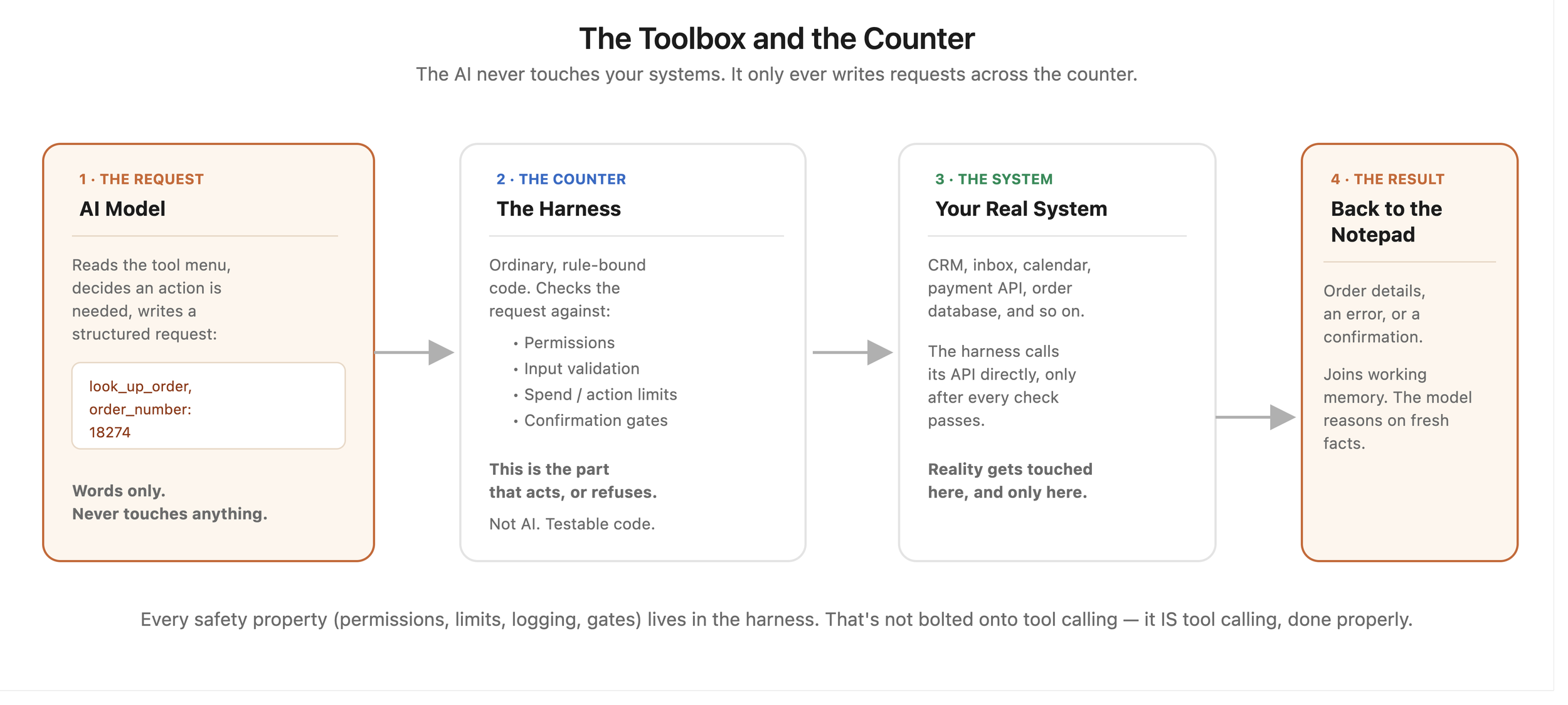
The analogy that carries the article: a locked toolbox with a signing-out sheet. The agent (a capable contractor) does not roam your premises with a master key. It stands at a counter, behind which sits a toolbox you stocked: only the tools you chose to include, each one shaped for a specific job, each checkout logged. The contractor can request the drill; it cannot request "access to the building." What is not in the box does not exist, as far as the contractor is concerned.
That framing answers the buyer's biggest implicit worry immediately: an agent's power is exactly the toolbox you stock, no more. "What can this AI do?" has a precise, auditable answer: read the tool list.
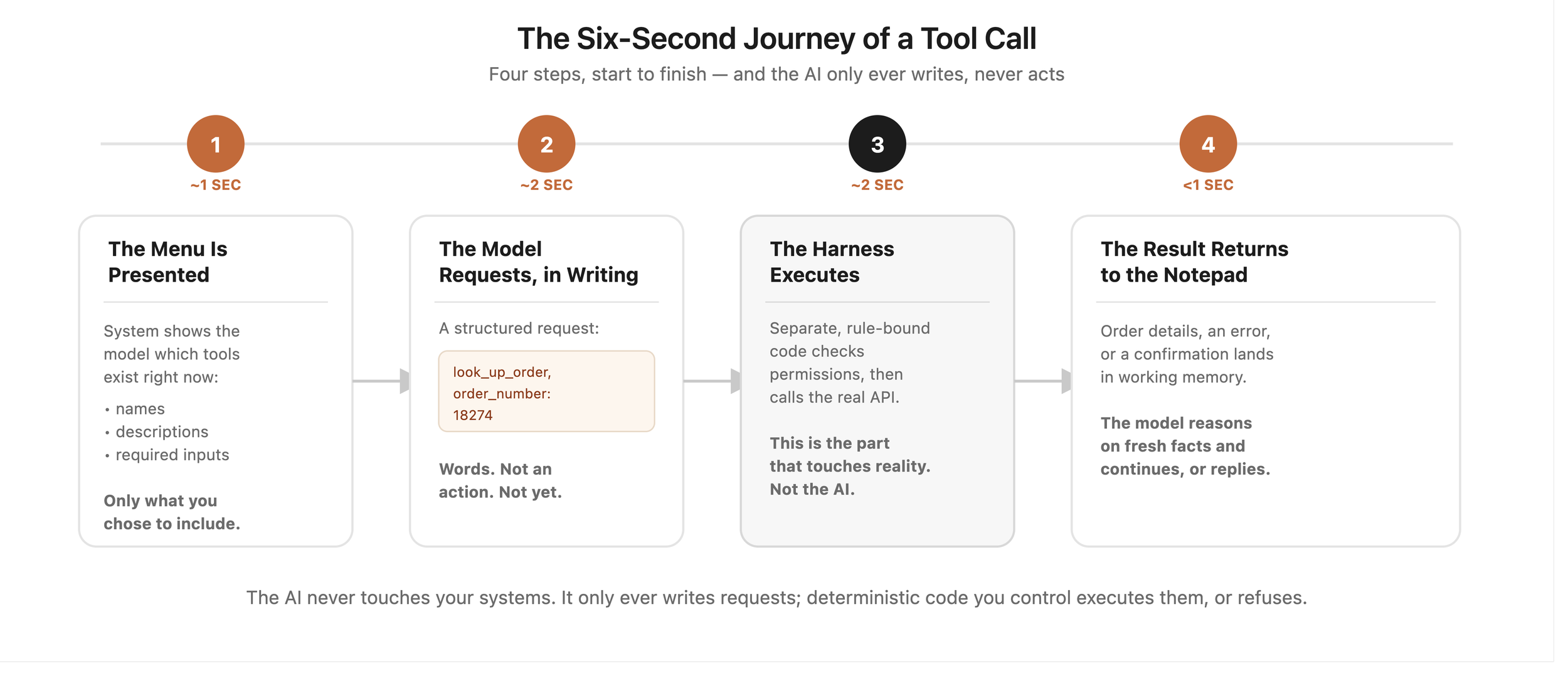
How a Tool Call Actually Works: The Six-Second Journey
Here is the mechanism, demystified, because it is genuinely simple.
Step 1: The menu is presented. When the agent runs, the system shows the model the available tools: names, descriptions, required inputs. This is just structured text; the model reads what is on offer like a contractor reading the toolbox inventory.
Step 2: The model requests, in writing. When the reasoning engine decides a tool is needed, it does not "do" anything. It produces a structured request: tool name plus inputs ("look_up_order, order_number: 18274"). Words, formatted for machines.
Step 3: The harness executes. A separate piece of ordinary software (the agent's harness or runtime) reads that request, checks it against permissions, and actually calls your system's API. This is the part that touches reality, and it is conventional, testable, rule-bound code, not AI.
Step 4: The result returns to the notepad. Whatever came back (the order details, an error, a confirmation) is placed into the model's context ([working memory]), and reasoning continues with fresh facts.
The detail worth savouring in step 3: the AI never touches your systems. It only ever writes requests; deterministic code you control executes them, or refuses. Every safety property you care about (permissions, limits, logging, gates) lives in that harness layer, which is why it can be genuinely reliable: rules enforcing rules, with the creative component kept safely on the requesting side of the counter. The [governance] mechanics are not bolted onto tool calling; they ARE tool calling, done properly.
Where MCP Fits: Standardising the Counter
Historically, every tool was custom-built for every agent: bespoke wrappers around each API, rebuilt per project, the drawer-of-cables era. MCP (Model Context Protocol) standardised the whole counter: a common way for any tool to describe itself, be discovered, and be called by any compatible agent, with authorisation in the protocol.
The practical consequences, covered fully in our [MCP guide]: thousands of ready-made tool servers for mainstream business systems, connections that take hours instead of weeks, and toolboxes that outlive any single vendor or model. For tool calling specifically, MCP means the menu in step 1 arrives pre-written and standardised, and the harness in step 3 speaks one protocol instead of fifty dialects. If APIs are how software talks, and tool calling is how agents request, MCP is the grammar they now share.
Why Should a Business Care About the Mechanics?
Because the tool list is the risk register. Forget vague worries about "what the AI might do": print the tool list. Read-only order lookup: negligible risk. Send-email-to-anyone: real risk, gate it. Issue-refund-unlimited: why does that tool exist? The most productive governance meeting you can have about any agent is an hour with its toolbox inventory, and now you know to ask for it.
Because tool design is where quotes are won and lost. Integration (building and wiring the tools) is routinely the largest line in agent builds (per our [pricing guide], and worst for API-less legacy systems). Understanding that "tools" means "wrapped, scoped capabilities" lets you read a quote intelligently: how many tools, over what standard (MCP means cheaper and reusable), against which systems.
Because tool granularity is a design choice you can influence. One broad tool ("database_access") versus five narrow ones ("look_up_order", "update_address", ...) is the difference between handing over a master key and stocking a proper toolbox. Narrow tools cost slightly more to build and repay it forever in safety, auditability and debuggability. It is exactly the least-privilege principle, expressed in the shape of the tools themselves.
What Goes Wrong: The Four Failure Modes
Wrong tool, right intention. The model picks a plausible-but-wrong tool ("update_address" when the customer asked about billing address history). Defences: clear tool names and descriptions (the model chooses by reading them; vague menus produce vague choices), and [reflection] checking results against intent.
Right tool, wrong inputs. Order 18274 becomes 18247. Defences live in the harness: input validation, existence checks before destructive actions, confirmation steps on anything consequential. Mechanical, cheap, and the reason step 3 being ordinary code is such good news.
The tool itself fails. APIs time out, systems return nonsense, the third-party is down. Defences: the [feedback loop] observing results honestly, retry logic with budgets, and escalation instead of improvisation when reality misbehaves.
The toolbox was overstocked. The genuinely dangerous one: an agent holding tools it never needed, until the day a confused plan or a manipulated input uses one. A support agent with a payment tool "for convenience" is the intern with the master key from our [governance guide]. Defence: stock the box for the job description, audit it quarterly, and treat every tool request from a builder ("it would be easier if the agent could also...") as the security decision it is.
The Standard SMB Toolbox: The Five Tools Most Agents Hold
Across small-business deployments, the same five tool families cover the overwhelming majority of useful work, which makes them a handy reference when scoping your own.
The looker-upper (read-only queries). Order status, customer records, stock levels, invoice states. Cheapest to build, lowest risk, and the tool family that alone powers most "where is my..." automation. Every first agent should be mostly this.
The document reader (retrieval). Search over your policies, prices and procedures: the [RAG] connection, exposed as a tool. This is how the agent's answers stay grounded in your actual documents, with citations.
The drafter (creates, cannot send). Emails, quotes, replies, records, prepared but held: the tool family that pairs naturally with [human approval] gates and lets an agent do 90% of the work while a person owns the release.
The scoped writer (narrow updates). Add a note to the CRM, update a delivery address, mark an invoice chased: writes, but each one narrow, validated and logged. The granularity rule bites hardest here: five narrow writers beat one broad one, every time.
The scheduler (time-based actions). Book the follow-up, set the reminder, queue the escalation for Monday. Unglamorous, and the family that turns one-shot answers into managed processes.
Notice what the standard box excludes: payment execution, mass communication, record deletion, and anything with "admin" in the name. Those tools exist in some deployments, behind gates, added deliberately and late. If a first-project scope includes them, the right response is the counter question this whole article has been building to: which job, exactly, needs that key?
A Real-World Shape
An accounts team's agent chases overdue invoices. Its entire toolbox: list_overdue_invoices (read-only), get_customer_history (read-only), draft_reminder_email (creates drafts, cannot send), send_approved_email (sends only drafts a human approved, logged), and schedule_follow_up (calendar writes, own calendar only).
Note what is absent: no payment tools, no ledger writes, no customer-record edits, no arbitrary email. The agent is highly capable at its job and structurally incapable of anything else. When the finance manager was asked by an auditor what the AI could do to the accounts system, she printed one page and the conversation took four minutes. That page is what good tool design buys: not just safety, but explicability, which in regulated contexts is worth as much.
The Buyer's Tool-Calling Checklist
- "Print the tool list." Names, what each does, read or write, limits. This one page is the agent's true capability statement.
- "Which tools are MCP-standard and which are bespoke?" Standard means cheaper now and portable later; bespoke everywhere deserves a why.
- "Show me the harness checks." Input validation, permission enforcement, confirmation on destructive actions: the ordinary-code safety layer, demonstrated.
- "Show me yesterday's tool log." Every call, with inputs and outcomes. The signing-out sheet either exists or the counter was never built.
- "What is the process for adding a tool?" The right answer involves scoping and sign-off, not "we just add it." Toolbox creep is how safe agents become risky ones between audits.
Frequently Asked Questions
What is tool calling in AI? The mechanism by which an AI agent uses real systems: the model produces a structured request (tool name plus inputs), and a separate, rule-bound software layer validates and executes it against your actual systems, returning the result to the model. The AI writes requests; ordinary code does the touching.
Is tool calling the same as function calling? Yes, same mechanism, different vintage of name: "function calling" is the developer-facing term from the model APIs; "tool calling" or "tool use" is the agent-context term. Both mean the model requesting a defined capability with structured inputs.
Can an AI agent do things I did not give it tools for? No, and this is the design's best property: the toolbox defines the agent's entire action space. The residual risks are misuse of tools it does have (managed by scoping, validation and gates) and toolbox creep over time (managed by audits). Hence the golden question: print the tool list.
How does MCP relate to tool calling? MCP standardises it: a common protocol for tools to describe themselves and be called, replacing bespoke per-project wiring. Practically it means ready-made tool servers for mainstream systems, faster cheaper integration, and toolboxes portable across models and vendors. Our [MCP guide] covers it in full.
What stops an agent calling a tool with wrong or harmful inputs? The harness: deterministic code that validates inputs, enforces permissions and limits, requires confirmation or human approval on consequential actions, and logs everything. The creative component only writes requests; the rule-bound component decides what executes. That separation is the safety architecture.
Why do tool integrations dominate agent build costs? Each tool is a wrapped, scoped, validated capability against a real system, and systems vary wildly in how cooperative they are: modern APIs and MCP servers connect in hours; legacy API-less systems need workarounds that dominate budgets. The toolbox, not the model, is usually most of the invoice, per our [pricing guide].
What happens if two agents (or an agent and a human) use the same tool at once? The harness handles it the way business systems always have: the underlying APIs enforce their own consistency, writes are validated at execution time (not at planning time, when the data might already be stale), and consequential writes re-check state before committing ("is this invoice still unpaid?"). It is a solved problem from ordinary software engineering, which is one more benefit of the AI never touching systems directly: the concurrency discipline lives in deterministic code where it has lived for decades.
Can tools be added or removed while an agent is running live? Mechanically yes, and MCP makes discovery of new tools nearly instant, which is exactly why the process question matters more than the technical one: every toolbox change should pass through the same scoping and sign-off as the original stocking, be announced in the tool log, and trigger a short re-test of affected workflows. The convenient mutability is a strength for maintenance and a risk for creep; the quarterly toolbox audit is what keeps the two apart.
The Takeaway
Tool calling is the counter between the talking and the doing: the AI requests, the harness checks and executes, the log records. The agent's whole real-world power is the toolbox you stocked, which means the agent's whole risk profile is one printable page.
Stock narrow tools for the actual job, insist on the standard protocol where it exists, keep the signing-out sheet, and audit the box before it creeps. Do that, and "what can your AI actually do?" stops being a philosophical question and becomes what it should always have been: an inventory, with your signature at the bottom.
Bots and Brand Works stocks agent toolboxes the locksmith's way: narrow tools, scoped permissions, MCP where it exists, logs always. Send us any agent's tool list (or ask your vendor for one and see what happens) and we will review it for free.
Need Help Implementing AI?
Resources and Further Reading
- Pillar article: Agentic AI vs Workflow Automation: The 2026 Enterprise Guide
- Related: [What Is MCP? A Plain-English Guide:]
- Related: What Is an AI Agent? The Anatomy:
- Also in this series: Agent Memory · Reflection · Human Approval
- Model Context Protocol: Click Here
- Anthropic tool use documentation: Click Here
- Anthropic: Building effective agents: Click Here